
Android softpone: SIP instant messaging
In the following lesson you will learn how to send and receive messages using the SIP Instant Messaging of the Ozeki Android SDK. So let's begin our journey, by creating the Xamarin Andorid application in Visual Studio.
Related: VoIP SIP instant messaging calls. If also you wish to build VoIP softphone on Windows, you might also be interested in a similar document, the VoIP SIP Instant Messaging in Ozeki VoIP SDK for Windows
Quick steps
- Download and install the Ozeki Andorid SDK
- Create a new Xamarin Android application in Viusal Studio
- Add the OzekiSDK.dll as a reference to our project
- Create the layout of the application
- Create a Softphone class that implements the ISoftphone interface
- Create the MainActivity.cs activity which will ask for the login details
- Create the MessagingActivity.cs activity, which will be responsible for sending and receiving messages.
- Debug your application (using a physical device or an emulator)
- Send your first message, using the example application.
The 05_Instant_Messages.zip file
You can download the 05_Instant_Messages example application bellow,
and start sending and receiving messages with it right now, or you can build
it yourself step by step to understand the base concept of the
Ozeki VoIP SIP SDK.
Download: 05_Instant_Messages.zip (2.17Mb)
Create a new Xamarin Android application in Visual Studio
To build our softphone application, we will create a new Xamarin Andorid project. In the following video I'll show you how to create a new Xamarin application in Visual Studio.
How to add the OzekiSDK.dll to our project as a reference
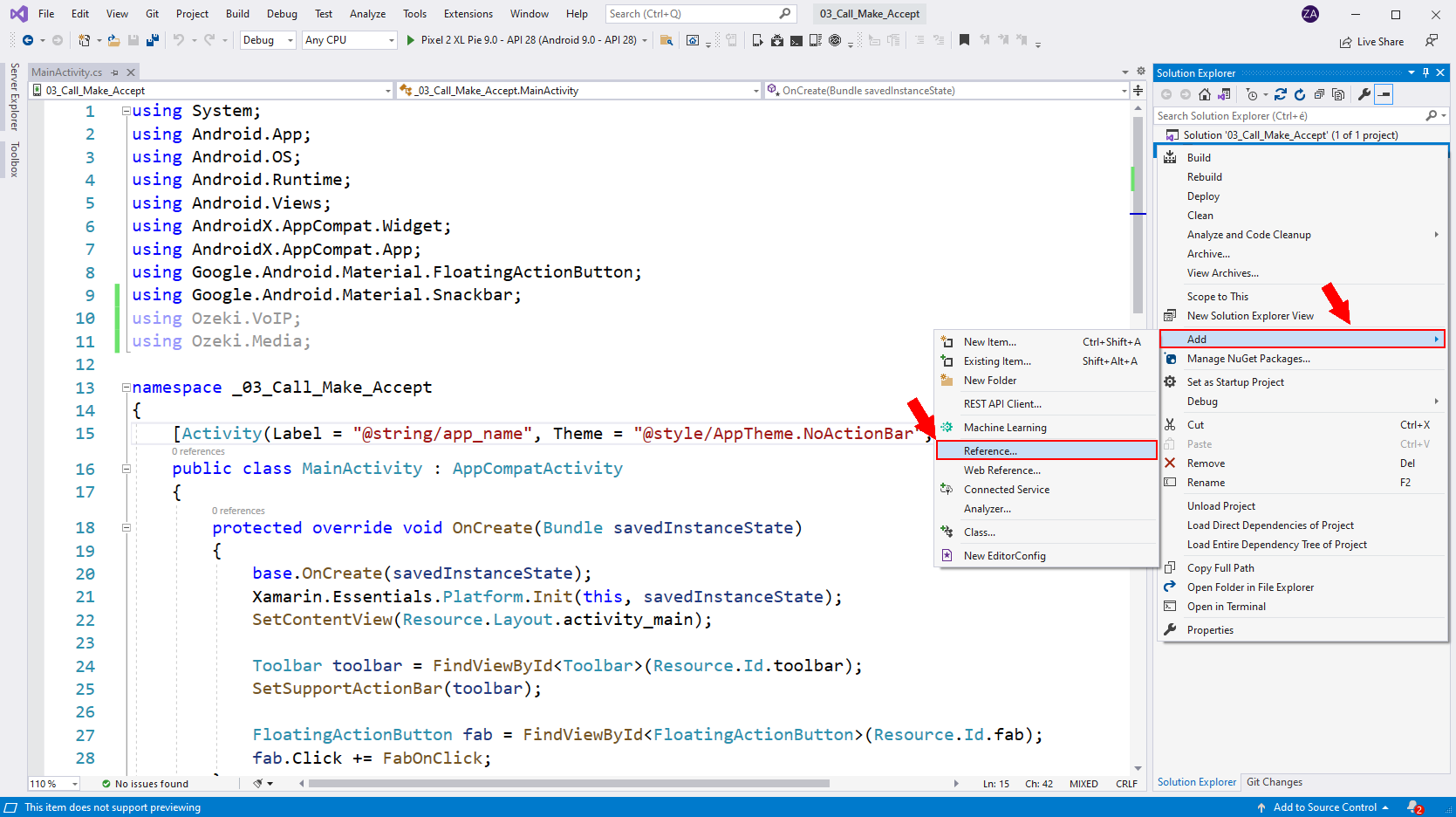
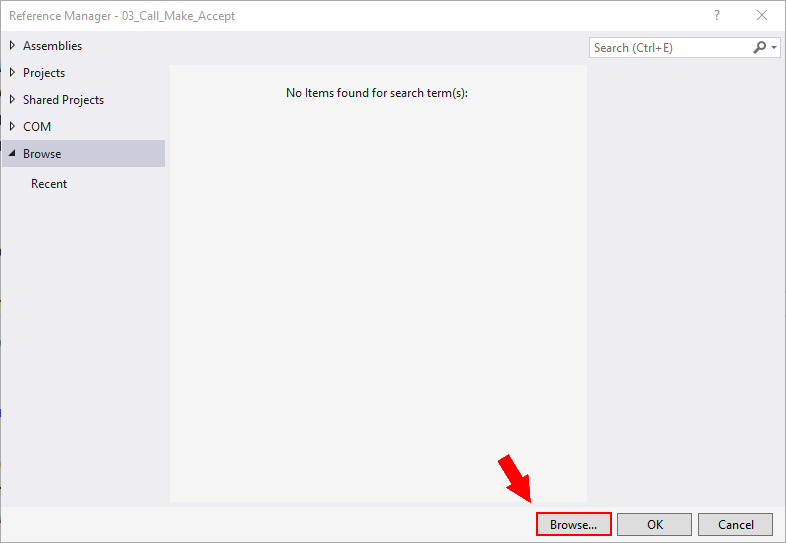
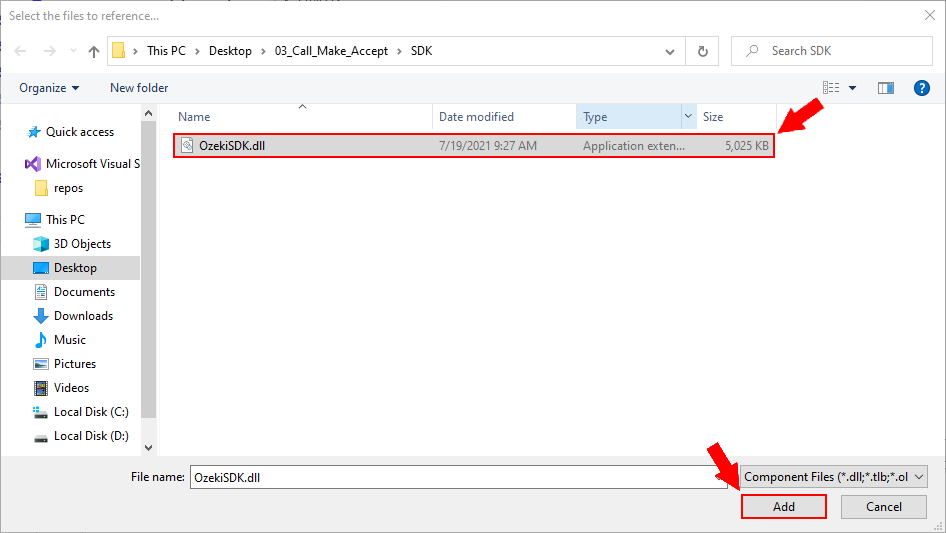
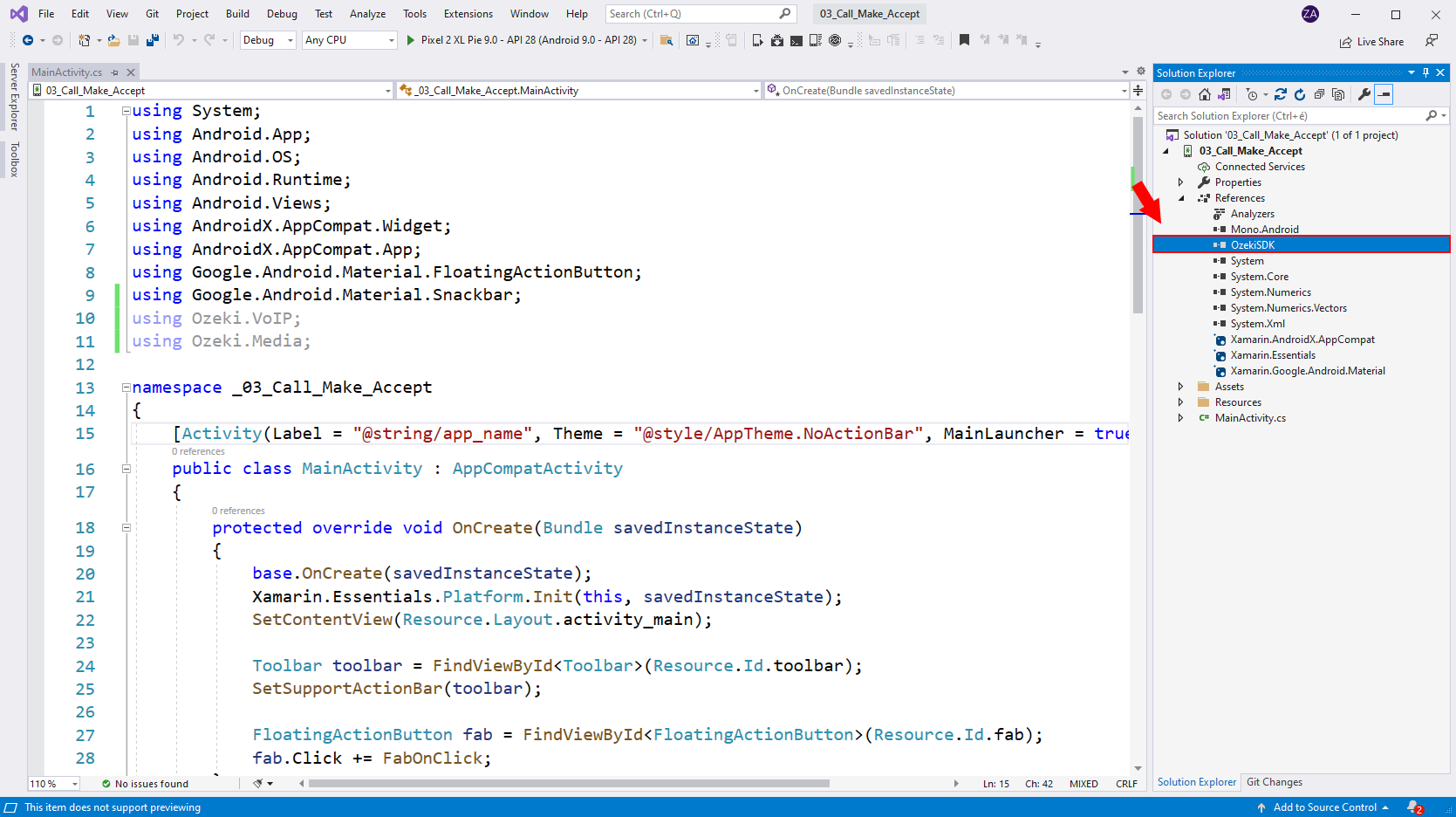
In order to use the contents of the Ozeki.VoIP namespace, we have to include the OzekiSDK.dll in our project. In the following video I'll show you how to add the OzekiSDK.dll reference to your project. You can find the OzekiSDK.dll file in the following place: C:\Program Files\Ozeki\Ozeki SDK for Android\SDK\MonoAndroid.
The layout of the application
For the MainActivity activity we are going to use the layout of the Android softphone: SIP registration example. This activity will be responsible for the SIP registration. For the MessagingActivity activity we created a new layout.
You can simply drag and drop these .xml files into you layout folder,
or you can create your own layout.
Download: layout.zip (1.83Kb)
<?xml version="1.0" encoding="utf-8"?>
<androidx.coordinatorlayout.widget.CoordinatorLayout xmlns:android="http://schemas.android.com/apk/res/android"
    xmlns:app="http://schemas.android.com/apk/res-auto"
    xmlns:tools="http://schemas.android.com/tools"
    android:layout_width="match_parent"
    android:layout_height="match_parent">

    <GridLayout
        android:layout_width="match_parent"
        android:layout_height="match_parent"
        android:rowCount="9"
    >

        <TextView
            android:layout_width="300dp"
            android:layout_gravity="center_vertical|center_horizontal"
            android:layout_height="wrap_content"
            android:layout_row="0"
            android:text="SIP registration"
            android:textSize="12pt"
            android:textAlignment="center"
            android:layout_marginTop="10dp"
        />

        <EditText
            android:id="@+id/inputDisplayName"
            android:layout_width="300dp"
            android:layout_gravity="center_vertical|center_horizontal"
            android:layout_height="wrap_content"
            android:layout_column="0"
            android:layout_row="1"
            android:hint="Display name"
            android:inputType="text"
        />

        <EditText
            android:id="@+id/inputUserName"
            android:layout_width="300dp"
            android:layout_gravity="center_vertical|center_horizontal"
            android:layout_height="wrap_content"
            android:layout_column="0"
            android:layout_row="2"
            android:hint="Username"
            android:inputType="text"
        />

        <EditText
            android:id="@+id/inputAuthenticationID"
            android:layout_width="300dp"
            android:layout_gravity="center_vertical|center_horizontal"
            android:layout_height="wrap_content"
            android:layout_column="0"
            android:layout_row="3"
            android:hint="Authentication ID"
            android:inputType="text"
        />

        <EditText
            android:id="@+id/inputRegisterPassword"
            android:layout_width="300dp"
            android:layout_gravity="center_vertical|center_horizontal"
            android:layout_height="wrap_content"
            android:layout_column="0"
            android:layout_row="4"
            android:inputType="textPassword"
            android:hint="Password"
        />

        <EditText
            android:id="@+id/inputDomainHost"
            android:layout_width="300dp"
            android:layout_gravity="center_vertical|center_horizontal"
            android:layout_height="wrap_content"
            android:layout_column="0"
            android:layout_row="5"
            android:hint="Host e.g.: 127.0.0.1"
            android:inputType="text"
        />

        <EditText
            android:id="@+id/inputDomainPort"
            android:layout_width="300dp"
            android:layout_gravity="center_vertical|center_horizontal"
            android:layout_height="wrap_content"
            android:layout_column="0"
            android:layout_row="6"
            android:hint="Port e.g.: 5060"
            android:inputType="text"
        />

        <Button
            android:id="@+id/btnLogin"
            android:layout_width="300dp"
            android:layout_gravity="center_vertical|center_horizontal"
            android:layout_height="wrap_content"
            android:layout_column="0"
            android:backgroundTint="@android:color/holo_red_light"
            android:textColor="@android:color/white"
            android:layout_row="7"
            android:text="Login"
        />

        <GridLayout
            android:layout_width="300dp"
            android:layout_height="wrap_content"
            android:layout_gravity="center_vertical|center_horizontal"
            android:layout_row="8"
            android:layout_column="0"
            android:rowCount="2"
            android:columnCount="1"
        >

            <TextView
                android:layout_width="match_parent"
                android:layout_height="wrap_content"
                android:textSize="10pt"
                android:text="Log:"
                android:layout_row="0"/>

            <TextView
                android:id="@+id/log"
                android:layout_width="match_parent"
                android:layout_height="120dp"/>

        </GridLayout>

    </GridLayout>

</androidx.coordinatorlayout.widget.CoordinatorLayout>
<?xml version="1.0" encoding="utf-8"?>
<androidx.coordinatorlayout.widget.CoordinatorLayout xmlns:android="http://schemas.android.com/apk/res/android"
    xmlns:app="http://schemas.android.com/apk/res-auto"
    xmlns:tools="http://schemas.android.com/tools"
    android:layout_width="match_parent"
    android:layout_height="match_parent">

    <GridLayout
        android:layout_width="match_parent"
        android:layout_height="wrap_content"
        android:rowCount="6"
        android:columnCount="1"
        android:layout_margin="10dp"
    >
        <TextView
            android:id="@+id/btnLogOut"
            android:layout_width="wrap_content"
            android:layout_height="wrap_content"
            android:layout_row="0"
            android:layout_column="0"
            android:text="Logout"
            android:layout_marginBottom="20dp"/>

        <TextView
            android:layout_width="match_parent"
            android:layout_height="wrap_content"
            android:layout_row="1"
            android:layout_column="0"
            android:text="SIP Instant Messaging"
            android:textSize="12pt"
            android:textAlignment="center"
            android:layout_margin="10dp"/>

        <TextView
            android:id="@+id/status"
            android:layout_width="match_parent"
            android:layout_height="wrap_content"
            android:text="Not registered."
            android:textAlignment="center"
            android:layout_row="2"/>

        <GridLayout
            android:layout_width="match_parent"
            android:layout_height="wrap_content"
            android:layout_row="3"
            android:rowCount="3"
            android:columnCount="1">

            <GridLayout
                android:layout_width="400dp"
                android:layout_height="wrap_content"
                android:layout_marginTop="20dp"
                android:layout_row="0"
                android:rowCount="1"
                android:columnCount="2"
                android:layout_gravity="center_vertical|center_horizontal"
            >
                <TextView
                    android:layout_width="100dp"
                    android:layout_height="wrap_content"
                    android:textSize="8pt"
                    android:text="Recipient: "/>

                <EditText
                    android:id="@+id/recipient"
                    android:layout_width="280dp"
                    android:layout_height="wrap_content"
                    android:layout_row="0"
                    android:layout_column="1"
                    android:hint="1000"/>

            </GridLayout>

            <GridLayout
                android:layout_width="400dp"
                android:layout_height="wrap_content"
                android:layout_marginTop="10dp"
                android:layout_row="1"
                android:layout_column="0"
                android:rowCount="1"
                android:columnCount="2"
                android:layout_gravity="center_vertical|center_horizontal" >

                    <TextView
                    android:layout_width="100dp"
                    android:layout_height="wrap_content"
                    android:textSize="8pt"
                    android:text="Message:"/>

                    <EditText
                        android:id="@+id/message"
                        android:layout_width="280dp"
                        android:layout_height="120dp"
                        android:layout_row="0"
                        android:layout_column="1"
                        android:textStyle=""
                        android:inputType="textImeMultiLine"
                    	android:hint="Hello world!"/>

            </GridLayout>

            <Button
                android:id="@+id/btnSend"
                android:layout_width="350dp"
                android:layout_height="wrap_content"
                android:layout_marginTop="20dp"
                android:layout_row="2"
                android:layout_column="0"
                android:text="SEND"
                android:backgroundTint="@android:color/holo_red_light"
                android:textColor="@android:color/white"
                android:layout_gravity="center_vertical|center_horizontal"/>

        </GridLayout>

        <GridLayout
            android:layout_width="match_parent"
            android:layout_height="wrap_content"
            android:columnCount="1"
            android:rowCount="2"
            android:layout_row="5"
            android:layout_column="0">

            <TextView
                android:layout_width="match_parent"
                android:layout_height="wrap_content"
                android:layout_row="0"
                android:layout_column="0"
                android:layout_marginTop="10dp"
                android:layout_marginBottom="10dp"
                android:textSize="8pt"
                android:text="Messages"/>

            <TextView
                android:id="@+id/logs"
                android:layout_width="match_parent"
                android:layout_row="1"
                android:layout_column="0"
                android:isScrollContainer="true"
                android:layout_height="150dp" />

        </GridLayout>

    </GridLayout>

</androidx.coordinatorlayout.widget.CoordinatorLayout>
Create the Softphone.cs file
With the softphone class, you can initialize a sofphone instance which will be responsible for sending and receiving the messages. In the following video you can see how to create the Softphone class.
Softphone.cs
using System;
using Ozeki.VoIP;
using System.Threading;

namespace _05_Instant_Messages
{
    class Softphone
    {
    	/* softphone object */

        private ISoftPhone _softphone;

        /* phoneline object */

        private IPhoneLine _phoneLine;

        /*
        	Our default constructor, initalizes our
        	softphone with deafult parameters.
        */

        public Softphone()
        {
            _softphone = SoftPhoneFactory.CreateSoftPhone(5000, 10000);
        }

        /*
        	We are using this method to register to a PBX.
        */

        public void Register(bool registrationRequired, string displayName,
			        string userName, string authenticationId, string registerPassword,
			        string domainHost, int domainPort)
        {
            try
            {
                /*
                	To register to a PBX, we need to create a SIP account.
                */

                var account = new SIPAccount(registrationRequired, displayName, userName, authenticationId, registerPassword, domainHost, domainPort);

                /*
                	With the SIP account and the NAT configuration,
                	we can create a phoneline.
                */

                _phoneLine = _softphone.CreatePhoneLine(account);

                /*
               		The phoneline has states, we need to handle the
               		event, when it is being changed.
               	*/

                _phoneLine.RegistrationStateChanged += phoneLine_PhoneLineStateChanged;
                _phoneLine.InstantMessaging.MessageReceived += phoneLine_InstantMessageReceived;

                /*
                	If our phoneline is created, we can register that.
                */

                _softphone.RegisterPhoneLine(_phoneLine);
            }
            catch (Exception ex)
            {
                Console.WriteLine("Error during SIP registration: " + ex);
            }
        }

        void phoneLine_InstantMessageReceived(object sender, InstantMessage e)
        {
            DispatchAsync(() =>
            {
                var handler = IncomingMessage;
                if (handler != null)
                    handler(this, e);
            });
        }

        void phoneLine_PhoneLineStateChanged(object sender, RegistrationStateChangedArgs e)
        {
            DispatchAsync(() =>
            {
                var handler = PhoneLineStateChanged;
                if (handler != null)
                    handler(this, e);
            });
        }

        /*
        	This method is used to solve the task blockings.
        */

        private void DispatchAsync(Action action)
        {
            ThreadPool.QueueUserWorkItem(o => action());
        }

        public event EventHandler<RegistrationStateChangedArgs> PhoneLineStateChanged;
        public event EventHandler<InstantMessage> IncomingMessage;

        public void SendMessage(InstantMessage message)
        {
            _phoneLine.InstantMessaging.SendMessage(message);
        }
    }
}
Create the MainActivity.cs file
This activity will be responsible for collecting the login details of the phone extension. After if have collected the credentials, it will store the values in the Xamarin.Essentials.Preferences, what you can use throughout the whole application.
MainActivity.cs
using System;
using Android.App;
using Android.OS;
using Android.Runtime;
using Android.Views;
using AndroidX.AppCompat.App;
using Android.Widget;

namespace _05_Instant_Messages
{
    [Activity(Label = "@string/app_name", Theme = "@style/AppTheme.NoActionBar", MainLauncher = true)]
    public class MainActivity : AppCompatActivity
    {
        Button _btnLogin;
        TextView _log;
        protected override void OnCreate(Bundle savedInstanceState)
        {
            base.OnCreate(savedInstanceState);
            Xamarin.Essentials.Platform.Init(this, savedInstanceState);
            SetContentView(Resource.Layout.activity_main);

            TestIfUserLoggedIn();

            _btnLogin = FindViewById<Button>(Resource.Id.btnLogin);
            _btnLogin.Click += OnClick__btnLogin;

            _log = FindViewById<TextView>(Resource.Id.log);
        }

        private void OnClick__btnLogin(object sender, EventArgs e)
        {
            string displayName = FindViewById<EditText>(Resource.Id.inputDisplayName).Text;
            string userName = FindViewById<EditText>(Resource.Id.inputUserName).Text;
            string authenticationId = FindViewById<EditText>(Resource.Id.inputAuthenticationID).Text;
            string registerPassword = FindViewById<EditText>(Resource.Id.inputRegisterPassword).Text;
            string domainHost = FindViewById<EditText>(Resource.Id.inputDomainHost).Text;
            int domainPort = -1;

            try
            {
                domainPort = Int32.Parse(FindViewById<EditText>(Resource.Id.inputDomainPort).Text);
            }
            catch (Exception exception)
            {
                _log.Text += "Please provide a valid PORT number!\n";
            }

            if (!string.IsNullOrEmpty(displayName) && !string.IsNullOrEmpty(userName)
                && !string.IsNullOrEmpty(authenticationId) && !string.IsNullOrEmpty(registerPassword)
                && !string.IsNullOrEmpty(domainHost) && domainPort != -1)
            {
            	/*
            		In this part of the code we use the Xamarin.Essentials.Preferences
            		to store our session details.
            	*/

                Xamarin.Essentials.Preferences.Set("display_name", displayName);
                Xamarin.Essentials.Preferences.Set("user_name", userName);
                Xamarin.Essentials.Preferences.Set("authentication_id", authenticationId);
                Xamarin.Essentials.Preferences.Set("register_password", registerPassword);
                Xamarin.Essentials.Preferences.Set("domain_host", domainHost);
                Xamarin.Essentials.Preferences.Set("domain_port", domainPort);

                StartActivity(typeof(MessagingActivity));
            }
            else
            {
                _log.Text += "Please fill all the required fields!\n";
            }
        }

		/*
			This method tests if the user logged in, by testing if the
			Xamarin.Essentials.Preferences contains the "display_name" key.
			If it doesn't, it means that we do not have a stored session because
			when we press the logout button in the MessaingActivity, it clears
			the Preferences.
		*/

        private void TestIfUserLoggedIn()
        {
            if (Xamarin.Essentials.Preferences.ContainsKey("display_name"))
            {
                StartActivity(typeof(MessagingActivity));
            }
        }

        public override bool OnCreateOptionsMenu(IMenu menu)
        {
            MenuInflater.Inflate(Resource.Menu.menu_main, menu);
            return true;
        }

        public override bool OnOptionsItemSelected(IMenuItem item)
        {
            int id = item.ItemId;
            if (id == Resource.Id.action_settings)
            {
                return true;
            }

            return base.OnOptionsItemSelected(item);
        }

        public override void OnRequestPermissionsResult(int requestCode, string[] permissions, [GeneratedEnum] Android.Content.PM.Permission[] grantResults)
        {
            Xamarin.Essentials.Platform.OnRequestPermissionsResult(requestCode, permissions, grantResults);

            base.OnRequestPermissionsResult(requestCode, permissions, grantResults);
        }
    }
}
Create the MessagingActivity.cs file
This activity will be responsible for sending and receiving messages, using the SIP instant messaging of the Ozeki Android SDK. If you send or recevice a message, it will be logged in the Messages section of the application. Furthermore you can see that it issues a SIP registration right in the moment you start your app . It retrieves the previously saved data from the Xamarin.Essentials.Preferences. If your login data was invalid, it will be not able to register your device, so you will see the "Not registered." text. If your device is not registered you will not be able to send a message, or receive one. If your device displays the "Registered." text, then you can start sending and receiving messages.
MessagingActivity.cs
using Android.App;
using Android.OS;
using Android.Text.Method;
using Android.Widget;
using Ozeki.VoIP;
using System;
using System.Text;

namespace _05_Instant_Messages
{
    [Activity(Label = "MessagingActivity")]
    public class MessagingActivity : Activity
    {
        Softphone _mySoftphone;

        EditText _recipient;
        EditText _message;
        Button _btnSend;
        TextView _btnLogOut;

        TextView _status;
        TextView _logs;
        private bool _registered;
        protected override void OnCreate(Bundle savedInstanceState)
        {
            base.OnCreate(savedInstanceState);
            Xamarin.Essentials.Platform.Init(this, savedInstanceState);
            SetContentView(Resource.Layout.activity_messaging);

            InitSoftphone();
            _registered = false;
            Register();

            _recipient = FindViewById<EditText>(Resource.Id.recipient);
            _message = FindViewById<EditText>(Resource.Id.message);

            _btnSend = FindViewById<Button>(Resource.Id.btnSend);
            _btnSend.Click += OnClick__btnSend;

            _status = FindViewById<TextView>(Resource.Id.status);
            _logs = FindViewById<TextView>(Resource.Id.logs);
            _logs.MovementMethod = new ScrollingMovementMethod();

            _btnLogOut = FindViewById<TextView>(Resource.Id.btnLogOut);
            _btnLogOut.Click += delegate { Xamarin.Essentials.Preferences.Clear(); StartActivity(typeof(MainActivity)); };
        }

        /*
        	This method initializes a Softphone instance.
        */

        private void InitSoftphone()
        {
            _mySoftphone = new Softphone();
            _mySoftphone.PhoneLineStateChanged += mySoftphone_PhoneLineStateChanged;
            _mySoftphone.IncomingMessage += _mySoftphone_IncomingMessage;
        }

        /*
        	This method listens to the changes in the phone line state.
        	If the pohne line state changed, it will decide wheter your device
        	is registered or not. If it is not, it will issue a registration
        	to the Ozeki Phone System until your device gets registered.
        */

        private void mySoftphone_PhoneLineStateChanged(object sender, RegistrationStateChangedArgs e)
        {
            if (e.State == RegState.Error || e.State == RegState.NotRegistered)
            {
                _registered = false;
                _status.Text = "Not registered.";
            }
            else if (e.State == RegState.RegistrationSucceeded)
            {
                _registered = true;
                _status.Text = "Registered.";
            }
        }

		/*
			This part of the code is responsible for receiving the messages.
			It will display the incoming message in the logs, right in the moment
			you receive it.
		*/

        private void _mySoftphone_IncomingMessage(object sender, InstantMessage message)
        {
            _logs.Text += String.Format("From {0}: {1}\n", message.Sender, message.Content);
        }

		/*
			This method is responsible for sending the message. It will also make
			some test before it sends the message.
		*/

        private void OnClick__btnSend(object sender, EventArgs e)
        {
            StringBuilder log = new StringBuilder();
            if (_registered)
            {
                if (!string.IsNullOrEmpty(_recipient.Text))
                {
                    if (!string.IsNullOrEmpty(_message.Text))
                    {
                        InstantMessage message = new InstantMessage(_recipient.Text, _message.Text);
                        _mySoftphone.SendMessage(message);
                        _logs.Text += String.Format("To {0}: {1}\n", _recipient.Text, _message.Text);
                        _recipient.Text = "";
                        _message.Text = "";
                    }
                    else
                    {
                        log.Append("You have to provide text for the message!\n");
                    }
                }
                else
                {
                    log.Append("You have to provide a recipient for the message!\n");
                }
            }
            else
            {
                log.Append("Your device is not registered! You can't send a message.\n");
            }

            _logs.Text += log.ToString();
        }

        /*
        	The Register method will issue a SIP registration to the Ozeki Phone
        	System.
        */

        private void Register()
        {
            bool registrationRequired = true;
            string displayName = Xamarin.Essentials.Preferences.Get("display_name", "");
            string userName = Xamarin.Essentials.Preferences.Get("user_name", "");
            string authenticationId = Xamarin.Essentials.Preferences.Get("authentication_id", "");
            string registerPassword = Xamarin.Essentials.Preferences.Get("register_password", "");
            string domainHost = Xamarin.Essentials.Preferences.Get("domain_host", "");
            int domainPort = Xamarin.Essentials.Preferences.Get("domain_port", 5060);

            _mySoftphone.Register(registrationRequired, displayName, userName, authenticationId,
                registerPassword, domainHost, domainPort);
        }

		/*
			This funcgtion overwrites the OnBackPressed() method of the class
			so if you press the back button, you will not be able to go back to
			the previous page. The only way you can go back to the registration
			page is if you press the logout button.
		*/

        public override void OnBackPressed()
        {
            return;
        }
    }
}