Android softpone: hold, hang up, redial, transfer
You can learn here how to control the call, such as putting the call on hold, taking the call off hold, transfering the call etc. This example requires the knowledge of SIP registering and the making of phone calles with the softphone. To learn these, you can visit the previous examples:
Related: VoIP SIP hold, hang up, redial, transfer calls. If also you wish to build VoIP softphone on Windows, you might also be interested in a similar document, the VoIP SIP Hold, Hang up, Redial, Transfer calls in Ozeki VoIP SDK for Windows
Quick steps
- Download and install the Ozeki Andorid SDK
- Create a new Xamarin Android application in Viusal Studio
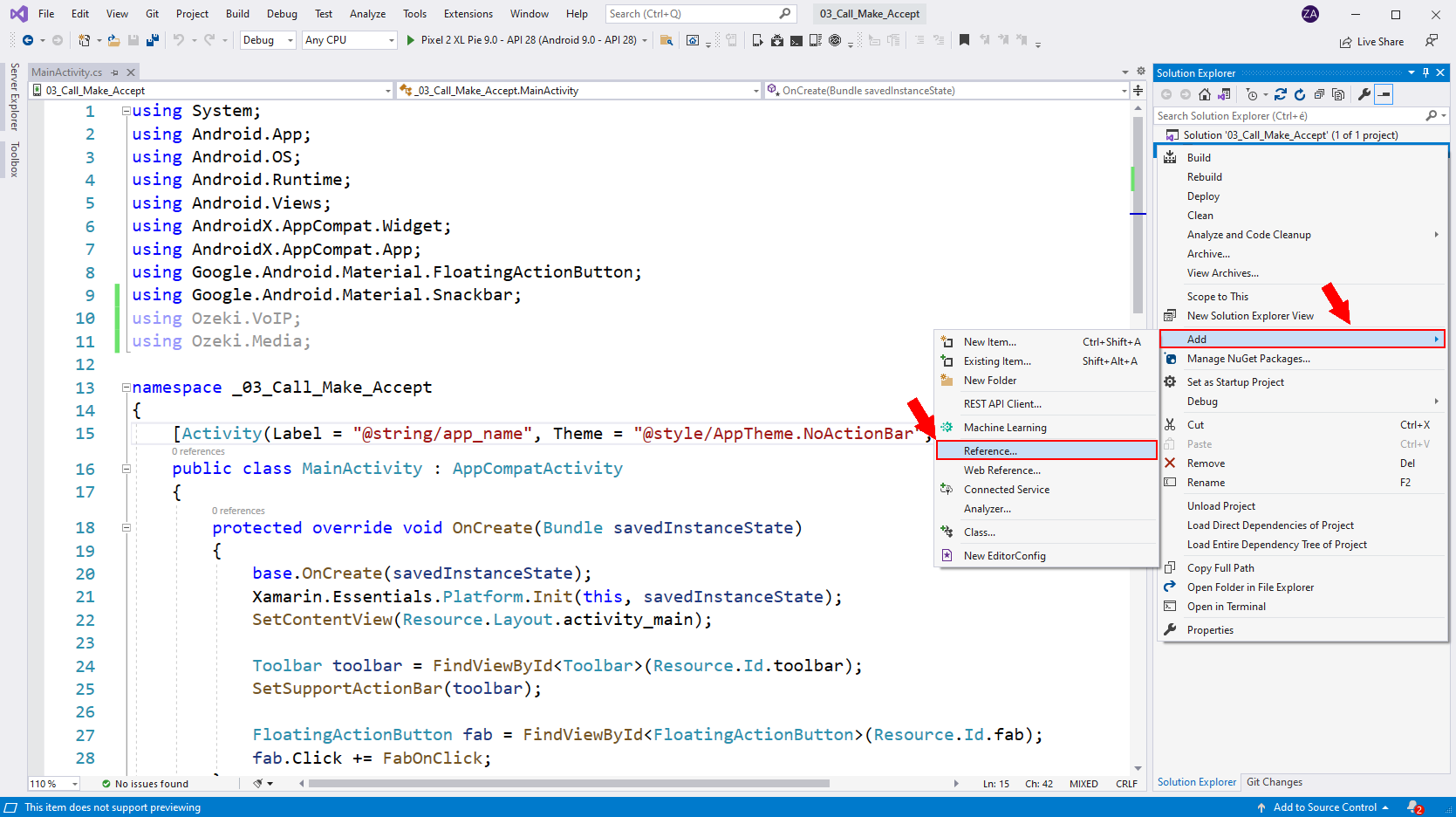
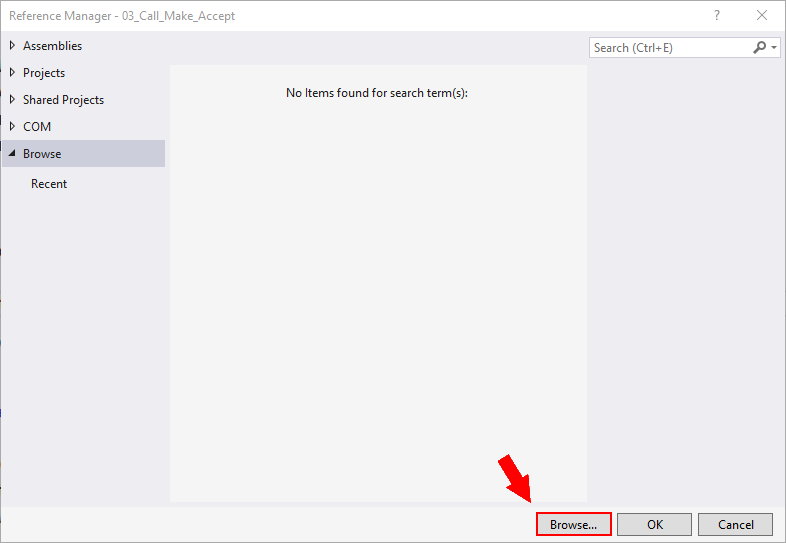
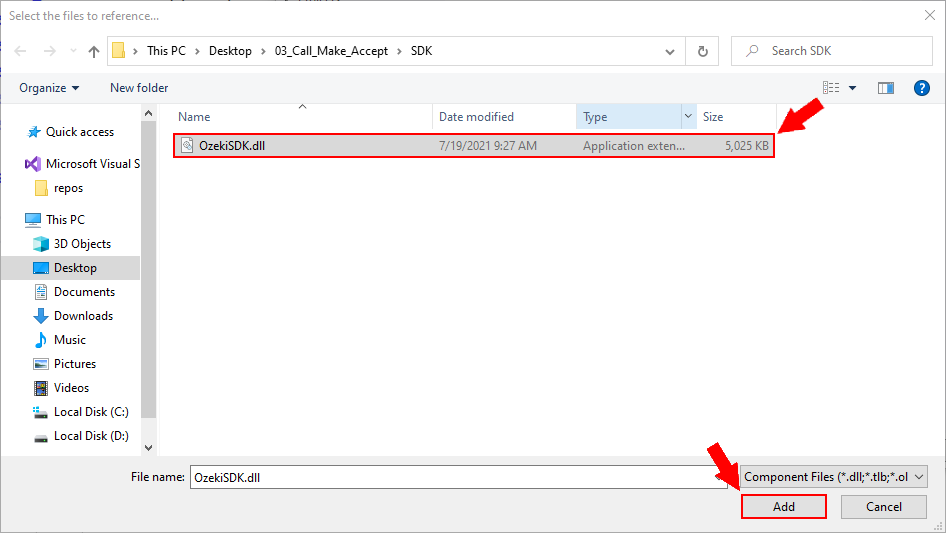
- Add the OzekiSDK.dll as a reference to our project
- Create the layout of the application
- Create a Softphone class that implements the ISoftphone interface
- Create the MainActivity.cs activity which will ask for the login details
- Create the DialingActivity.vs activity, which will be responsible for making, holding, and transferring calls and recalling the previous number.
- Give microphone permission for your softphone application
- Debug your application (using a physical device or an emulator)
- Make your first call transfer, hold a call or redial a number with the softphone based on the Ozeki VoIP SIP SDK
The 04_Call_Control.zip file
You can download the 04_Call_Control example application bellow,
and start to make and transfer, hold and redial with it right now, or you can build
it yourself step by step to understand the base concept of the
Ozeki VoIP SIP SDK.
Download: 04_Call_Control.zip (2.17Mb)
What knowledge would you need?
To fully understand this guide, you might need to study the following chapters first:
- SIP registration: you can learn how to begin softphone developing and how to be able to register to a pbx with a sip account. Learn more...
- Managing media handlers: you can find here examples and a simple guide about how to be able to use, connect and manage different media handlers, and how can you attach them to calls. Learn more...
- Making and accepting calls: from this guide you can learn how can your softphone make and accept calls, and handle the calls' states. Learn more...
Create a new Xamarin Android application in Visual Studio
To build our softphone application, we will create a new Xamarin Andorid project. In the following video I'll show you how to create a new Xamarin application in Visual Studio.
How to add the OzekiSDK.dll to our project as a reference
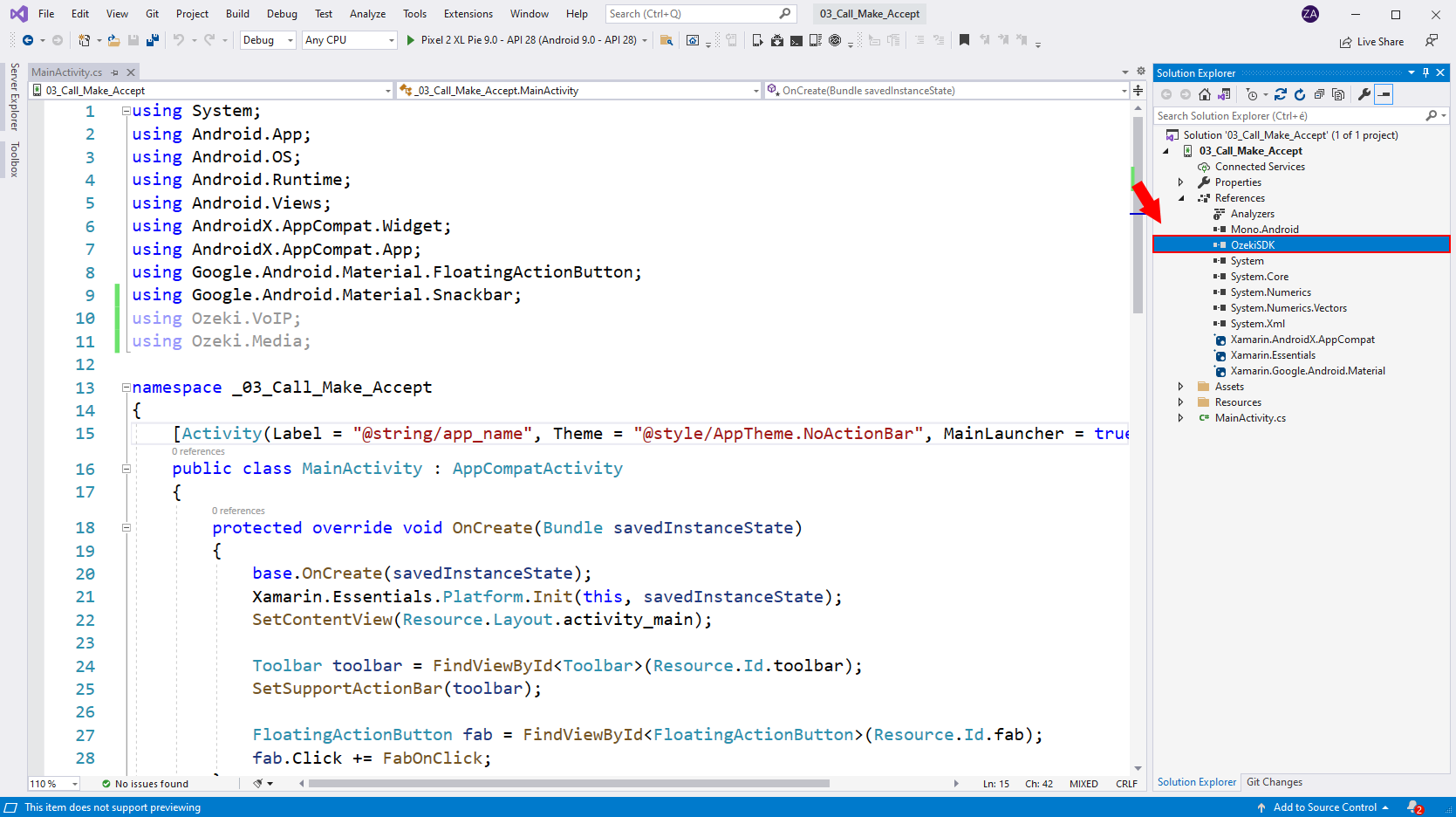
In order to use the contents of the Ozeki.VoIP and Ozeki.Media namespaces, we have to include the OzekiSDK.dll in our project. In the following video I'll show you how to add the OzekiSDK.dll reference to your project. You can find the OzekiSDK.dll file in the following place: C:\Program Files\Ozeki\Ozeki SDK for Android\SDK\MonoAndroid.
The layout of the application
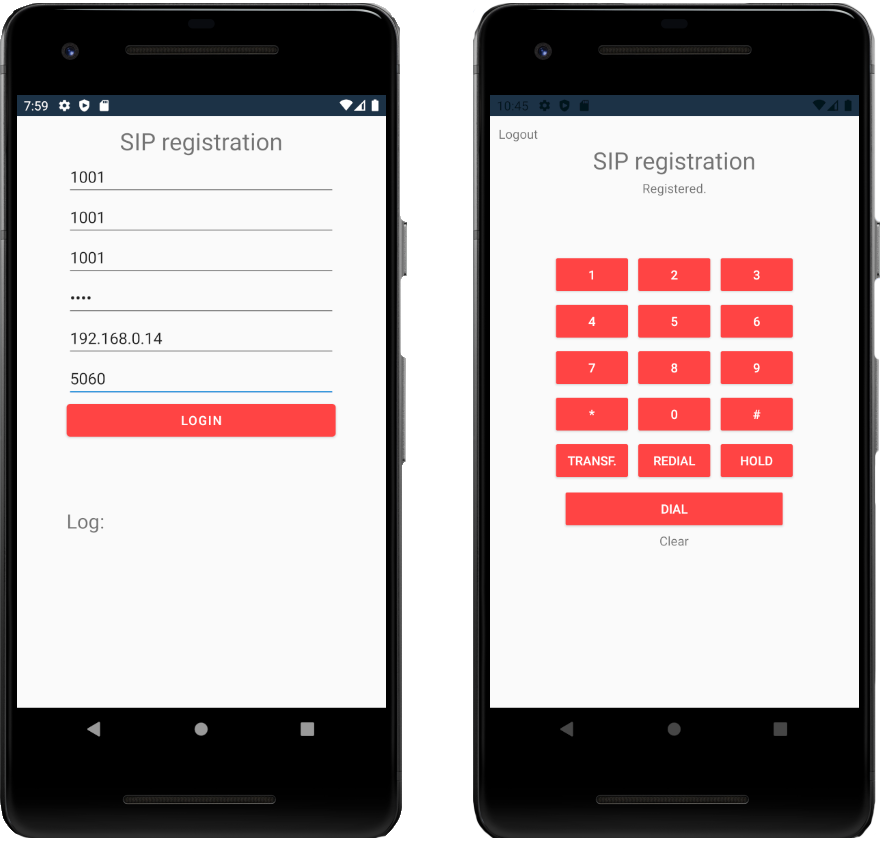
We are going to use the layout of the Android softphone: Make calls example application with some modifications. You may have noticed that we have added three more buttons which are going to be responsible to transferring the call, holding the call and redialing the last number.
You can simply drag and drop these .xml files into you layout folder,
or you can create your own layout.
Download: layout.zip
<?xml version="1.0" encoding="utf-8"?>
<androidx.coordinatorlayout.widget.CoordinatorLayout xmlns:android="http://schemas.android.com/apk/res/android"
    xmlns:app="http://schemas.android.com/apk/res-auto"
    xmlns:tools="http://schemas.android.com/tools"
    android:layout_width="match_parent"
    android:layout_height="match_parent">

    <GridLayout
        android:layout_width="match_parent"
        android:layout_height="match_parent"
        android:rowCount="9"
    >

        <TextView
            android:layout_width="300dp"
            android:layout_gravity="center_vertical|center_horizontal"
            android:layout_height="wrap_content"
            android:layout_row="0"
            android:text="SIP registration"
            android:textSize="12pt"
            android:textAlignment="center"
            android:layout_marginTop="10dp"
        />

        <EditText
            android:id="@+id/inputDisplayName"
            android:layout_width="300dp"
            android:layout_gravity="center_vertical|center_horizontal"
            android:layout_height="wrap_content"
            android:layout_column="0"
            android:layout_row="1"
            android:hint="Display name"
            android:inputType="text"
        />

        <EditText
            android:id="@+id/inputUserName"
            android:layout_width="300dp"
            android:layout_gravity="center_vertical|center_horizontal"
            android:layout_height="wrap_content"
            android:layout_column="0"
            android:layout_row="2"
            android:hint="Username"
            android:inputType="text"
        />

        <EditText
            android:id="@+id/inputAuthenticationID"
            android:layout_width="300dp"
            android:layout_gravity="center_vertical|center_horizontal"
            android:layout_height="wrap_content"
            android:layout_column="0"
            android:layout_row="3"
            android:hint="Authentication ID"
            android:inputType="text"
        />

        <EditText
            android:id="@+id/inputRegisterPassword"
            android:layout_width="300dp"
            android:layout_gravity="center_vertical|center_horizontal"
            android:layout_height="wrap_content"
            android:layout_column="0"
            android:layout_row="4"
            android:inputType="textPassword"
            android:hint="Password"
        />

        <EditText
            android:id="@+id/inputDomainHost"
            android:layout_width="300dp"
            android:layout_gravity="center_vertical|center_horizontal"
            android:layout_height="wrap_content"
            android:layout_column="0"
            android:layout_row="5"
            android:hint="Host e.g.: 127.0.0.1"
            android:inputType="text"
        />

        <EditText
            android:id="@+id/inputDomainPort"
            android:layout_width="300dp"
            android:layout_gravity="center_vertical|center_horizontal"
            android:layout_height="wrap_content"
            android:layout_column="0"
            android:layout_row="6"
            android:hint="Port e.g.: 5060"
            android:inputType="text"
        />

        <Button
            android:id="@+id/btnLogin"
            android:layout_width="300dp"
            android:layout_gravity="center_vertical|center_horizontal"
            android:layout_height="wrap_content"
            android:layout_column="0"
            android:backgroundTint="@android:color/holo_red_light"
            android:textColor="@android:color/white"
            android:layout_row="7"
            android:text="Login"
        />

        <GridLayout
            android:layout_width="300dp"
            android:layout_height="wrap_content"
            android:layout_gravity="center_vertical|center_horizontal"
            android:layout_row="8"
            android:layout_column="0"
            android:rowCount="2"
            android:columnCount="1"
        >

            <TextView
                android:layout_width="match_parent"
                android:layout_height="wrap_content"
                android:textSize="10pt"
                android:text="Log:"
                android:layout_row="0"/>

            <TextView
                android:id="@+id/log"
                android:layout_width="match_parent"
                android:layout_height="120dp"/>

        </GridLayout>

    </GridLayout>

</androidx.coordinatorlayout.widget.CoordinatorLayout>
<?xml version="1.0" encoding="utf-8"?>
<RelativeLayout xmlns:android="http://schemas.android.com/apk/res/android"
    xmlns:app="http://schemas.android.com/apk/res-auto"
    xmlns:tools="http://schemas.android.com/tools"
    android:layout_width="match_parent"
    android:layout_height="match_parent"
    app:layout_behavior="@string/appbar_scrolling_view_behavior">

    <GridLayout
        android:layout_width="match_parent"
        android:layout_height="wrap_content"
        android:rowCount="7"
        android:columnCount="1"
    >

        <TextView
            android:id="@+id/btnLogOut"
            android:layout_width="match_parent"
            android:layout_marginTop="10dp"
            android:layout_marginLeft="10dp"
            android:layout_height="wrap_content"
            android:text="Logout"
            android:layout_row="0"
            android:layout_column="0"
            android:layout_margin="2dp"
        />

        <TextView
            android:layout_width="300dp"
            android:layout_height="wrap_content"
            android:layout_margin="2dp"
            android:layout_gravity="center_vertical|center_horizontal"
            android:textAlignment="center"
            android:textSize="12pt"
            android:layout_row="1"
            android:layout_column="0"
            android:text="SIP registration"/>

        <TextView
            android:id="@+id/status"
            android:layout_width="250dp"
            android:layout_height="wrap_content"
            android:layout_margin="2dp"
            android:textAlignment="center"
            android:layout_row="2"
            android:layout_column="0"
            android:layout_gravity="center_vertical|center_horizontal"
            android:text="Not registered"
        />

        <TextView
            android:id="@+id/inputNumberToCall"
            android:layout_width="300dp"
            android:layout_height="wrap_content"
            android:layout_margin="2dp"
            android:textAlignment="center"
            android:layout_row="3"
            android:textSize="18pt"
            android:layout_column="0"
            android:layout_gravity="center_vertical|center_horizontal"
        />

        <GridLayout
            android:layout_width="wrap_content"
            android:layout_height="wrap_content"
            android:layout_margin="2dp"
            android:layout_gravity="center_vertical|center_horizontal"
            android:layout_row="4"
            android:layout_column="0"
            android:rowCount="5"
            android:columnCount="3"
        >

            <Button
                android:id="@+id/btnOne"
                android:layout_width="wrap_content"
                android:layout_height="wrap_content"
                android:text="1"
                android:layout_row="0"
                android:layout_margin="2dp"
                android:layout_column="0"
                android:backgroundTint="@android:color/holo_red_light"
                android:textColor="@android:color/white"
            />

            <Button
                android:id="@+id/btnTwo"
                android:layout_width="wrap_content"
                android:layout_height="wrap_content"
                android:text="2"
                android:layout_row="0"
                android:layout_margin="2dp"
                android:layout_column="1"
                android:backgroundTint="@android:color/holo_red_light"
                android:textColor="@android:color/white"
            />

            <Button
                android:id="@+id/btnThree"
                android:layout_width="wrap_content"
                android:layout_height="wrap_content"
                android:text="3"
                android:layout_row="0"
                android:layout_margin="2dp"
                android:layout_column="2"
                android:backgroundTint="@android:color/holo_red_light"
                android:textColor="@android:color/white"
            />

            <Button
                android:id="@+id/btnFour"
                android:layout_width="wrap_content"
                android:layout_height="wrap_content"
                android:text="4"
                android:layout_row="1"
                android:layout_margin="2dp"
                android:layout_column="0"
                android:backgroundTint="@android:color/holo_red_light"
                android:textColor="@android:color/white"
            />

            <Button
                android:id="@+id/btnFive"
                android:layout_width="wrap_content"
                android:layout_height="wrap_content"
                android:text="5"
                android:layout_row="1"
                android:layout_margin="2dp"
                android:layout_column="1"
                android:backgroundTint="@android:color/holo_red_light"
                android:textColor="@android:color/white"
            />

            <Button
                android:id="@+id/btnSix"
                android:layout_width="wrap_content"
                android:layout_height="wrap_content"
                android:text="6"
                android:layout_row="1"
                android:layout_margin="2dp"
                android:layout_column="2"
                android:backgroundTint="@android:color/holo_red_light"
                android:textColor="@android:color/white"
            />

            <Button
                android:id="@+id/btnSeven"
                android:layout_width="wrap_content"
                android:layout_height="wrap_content"
                android:text="7"
                android:layout_row="2"
                android:layout_margin="2dp"
                android:layout_column="0"
                android:backgroundTint="@android:color/holo_red_light"
                android:textColor="@android:color/white"
            />

            <Button
                android:id="@+id/btnEight"
                android:layout_width="wrap_content"
                android:layout_height="wrap_content"
                android:text="8"
                android:layout_row="2"
                android:layout_margin="2dp"
                android:layout_column="1"
                android:backgroundTint="@android:color/holo_red_light"
                android:textColor="@android:color/white"
            />

            <Button
                android:id="@+id/btnNine"
                android:layout_width="wrap_content"
                android:layout_height="wrap_content"
                android:text="9"
                android:layout_row="2"
                android:layout_margin="2dp"
                android:layout_column="2"
                android:backgroundTint="@android:color/holo_red_light"
                android:textColor="@android:color/white"
            />

            <Button
                android:id="@+id/btnStar"
                android:layout_width="wrap_content"
                android:layout_height="wrap_content"
                android:text="*"
                android:layout_row="3"
                android:layout_margin="2dp"
                android:layout_column="0"
                android:backgroundTint="@android:color/holo_red_light"
                android:textColor="@android:color/white"
            />

            <Button
                android:id="@+id/btnZero"
                android:layout_width="wrap_content"
                android:layout_height="wrap_content"
                android:text="0"
                android:layout_row="3"
                android:layout_margin="2dp"
                android:layout_column="1"
                android:backgroundTint="@android:color/holo_red_light"
                android:textColor="@android:color/white"
            />

            <Button
                android:id="@+id/btnHashtag"
                android:layout_width="wrap_content"
                android:layout_height="wrap_content"
                android:text="#"
                android:layout_row="3"
                android:layout_margin="2dp"
                android:layout_column="2"
                android:backgroundTint="@android:color/holo_red_light"
                android:textColor="@android:color/white"
            />

            <Button
                android:id="@+id/btnTrasfer"
                android:layout_width="wrap_content"
                android:layout_height="wrap_content"
                android:layout_row="4"
                android:layout_column="0"
                android:backgroundTint="@android:color/holo_red_light"
                android:textColor="@android:color/white"
                android:layout_margin="2dp"
                android:text="Transf."/>

            <Button
                android:id="@+id/btnRedial"
                android:layout_width="wrap_content"
                android:layout_height="wrap_content"
                android:layout_row="4"
                android:layout_column="1"
                android:backgroundTint="@android:color/holo_red_light"
                android:textColor="@android:color/white"
                android:layout_margin="2dp"
                android:text="Redial"/>

            <Button
                android:id="@+id/btnHold"
                android:layout_width="wrap_content"
                android:layout_height="wrap_content"
                android:layout_row="4"
                android:layout_column="2"
                android:backgroundTint="@android:color/holo_red_light"
                android:textColor="@android:color/white"
                android:layout_margin="2dp"
                android:text="Hold"/>
        </GridLayout>

        <Button
            android:id="@+id/btnInteractions"
            android:layout_width="250dp"
            android:layout_height="wrap_content"
            android:layout_row="5"
            android:layout_column="0"
            android:layout_margin="2dp"
            android:backgroundTint="@android:color/holo_red_light"
            android:textColor="@android:color/white"
            android:layout_gravity="center_vertical|center_horizontal"
            android:text="Dial"
        />


        <TextView
            android:id="@+id/btnClear"
            android:layout_width="wrap_content"
            android:layout_height="wrap_content"
            android:layout_gravity="center_vertical|center_horizontal"
            android:layout_row="6"
            android:layout_column="0"
                android:layout_margin="2dp"
            android:text="Clear"
        />

    </GridLayout>

</RelativeLayout>
What is Softphone.cs used for?
This class is used to introduce how to declare, define and initialize a softphone, how to handle some of the Ozeki VoIP SIP SDK's events and how to use some of that's functions. In other words, we would like to create a "telephone software", which has the same functions (or much more), as an ordinary mobile (or any other) phone. In the DialingActivity.cs activity we will use this class to create a new softphone, so we can use the functions, we can listen to the events placed here. We have no new objects or variables to introduce in this example. In order to reduce the code size we have removed the AcceptCall method of the softphone, and because of it the final product will not be able to receive calls.
using System;
using Ozeki.VoIP;
using Ozeki.Media;
using System.Threading;

namespace _04_Call_Control
{
    class Softphone
    {
        ISoftPhone _softphone;                   // softphone object
        IPhoneLine _phoneLine;                   // phone line object
        IPhoneCall _call;                        // the call object
        Microphone _microphone;
        Speaker _speaker;
        MediaConnector _connector;               // connects the devices to each other (eg. microphone, speaker, mediaSender, mediaReceiver)
        PhoneCallAudioSender _mediaSender;       // after connected with the microphone, this will be attached to the call
        PhoneCallAudioReceiver _mediaReceiver;   // after connected with the speaker, this will be attached to the call

        #region Events

        /// <summary>
        /// Occurs when the registration state of the phone line has changed.
        /// </summary>
        public event EventHandler<RegistrationStateChangedArgs> PhoneLineStateChanged;

        /// <summary>
        /// Occurs when the state of the call has changed.
        /// </summary>
        public event EventHandler<CallStateChangedArgs> CallStateChanged;

        #endregion


        /// <summary>
        /// Default constructor, initalizes the softphone with deafult parameters.
        /// </summary>
        public Softphone()
        {
            _softphone = SoftPhoneFactory.CreateSoftPhone(5000, 10000);

            _microphone = Microphone.GetDefaultDevice();
            _speaker = Speaker.GetDefaultDevice();
            _connector = new MediaConnector();
            _mediaSender = new PhoneCallAudioSender();
            _mediaReceiver = new PhoneCallAudioReceiver();
        }


        /// <summary>
        /// Registers the SIP account to the PBX.
        /// Calls cannot be made while the SIP account is not registered.
        /// If the SIP account requires no registration, the RegisterPhoneLine() must be called too to register the SIP account to the ISoftPhone.
        /// </summary>
        public void Register(bool registrationRequired, string displayName, string userName, string authenticationId, string registerPassword, string domainHost, int domainPort)
        {
            try
            {
                // To register to a PBX, we need to create a SIP account
                var account = new SIPAccount(registrationRequired, displayName, userName, authenticationId, registerPassword, domainHost, domainPort);
                Console.WriteLine("\nCreating SIP account {0}", account);

                // With the SIP account and the NAT configuration, we can create a phoneline.
                _phoneLine = _softphone.CreatePhoneLine(account);
                Console.WriteLine("Phoneline created.");
                // The phoneline has states, we need to handle the event, when it is being changed.
                _phoneLine.RegistrationStateChanged += phoneLine_PhoneLineStateChanged;

                // If our phoneline is created, we can register that.
                _softphone.RegisterPhoneLine(_phoneLine);

                // For further information about the calling of the ConnectMedia(), please check the implementation of this method.
                ConnectMedia();
            }
            catch (Exception ex)
            {
                Console.WriteLine("Error during SIP registration: " + ex.ToString());
            }
        }


        /// <summary>
        /// This will be called when the registration state of the phone line has changed.
        /// </summary>
        private void phoneLine_PhoneLineStateChanged(object sender, RegistrationStateChangedArgs e)
        {
            DispatchAsync(() =>
            {
                var handler = PhoneLineStateChanged;
                if (handler != null)
                    handler(this, e);
            });
        }


        /// <summary>
        /// Starts the capturing and playing audio/video devices.
        /// Other devices can be used (and started), for example: WebCamera or WaveStreamPlayback.
        /// </summary>
        private void StartDevices()
        {
            if (_microphone != null)
            {
                _microphone.Start();
            }

            if (_speaker != null)
            {
                _speaker.Start();
            }
        }


        /// <summary>
        /// Stops the capturing and playing audio/video devices.
        /// Other devices can be stopped, for example: WebCamera.
        /// </summary>
        private void StopDevices()
        {
            if (_microphone != null)
            {
                _microphone.Stop();
            }

            if (_speaker != null)
            {
                _speaker.Stop();
            }
        }


        #region Media handling guide
        /*
         To send our voice through the microphone to the other client's speaker, we need to connect them.
         We send our voice through the mediaSender, and we get the other client's voice through the mediaSender to our speaker object.

         To disconnect these handlers, we will use the DisconnectMedia() method.

         It is possible to use other mediahandlers with the connector, for example we can connect a WaveStreamPlayback or an MP3StreamPlayback object to the MediaSender, so we can play music/voice
         during the call. For exmaple: when can create an IVR (Interactive Voice Response), we can create voice recorder etc.

         For example:
         We can connect an .mp3 file player (which plays an mp3 file into the voice call) by the "connector.Connect(Mp3StreamPlayback, mediaSender);  " line.
         (We should also create an MP3StreamPlayback object: "MP3StreamPlayback Mp3StreamPlayback; "
         and we need to tell to this object the details (what to play into the speaker, etc.))
         */
        #endregion


        /// <summary>
        /// Connects the audio handling devices to each other.
        /// The audio data will flow from the source to the destination.
        /// </summary>
        private void ConnectMedia()
        {
            if (_microphone != null)
            {
                _connector.Connect(_microphone, _mediaSender);
            }

            if (_speaker != null)
            {
                _connector.Connect(_mediaReceiver, _speaker);
            }
        }


        /// <summary>
        /// Disconnects the audio handling devices from each other.
        /// </summary>
        private void DisconnectMedia()
        {
            if (_microphone != null)
            {
                _connector.Disconnect(_microphone, _mediaSender);
            }

            if (_speaker != null)
            {
                _connector.Disconnect(_mediaReceiver, _speaker);
            }


            // If you would like to disconnect all of the connections, you can use this line:
            // connector.Dispose();
            // Please note that, the media handler won't be disposed, only the connections.
        }


        /// <summary>
        /// Subscribes to the events of a call to receive notifications such as the state of the call has changed.
        /// In this sample subscribes only to the state changed and error occurred events.
        /// </summary>
        private void WireUpCallEvents()
        {
            _call.CallStateChanged += (call_CallStateChanged);
        }


        /// <summary>
        /// Unsubscribes from the events of a call.
        /// </summary>
        private void WireDownCallEvents()
        {
            _call.CallStateChanged -= (call_CallStateChanged);
        }


        /// <summary>
        /// This will be called when the state of the call call has changed.
        /// </summary>
        /// <remarks>
        /// In this sample only three states will be handled: Answered, InCall, Ended, LocalHeld
        ///
        /// Answered: when the call has been answered, the audio devices will be started and attached to the call.
        /// It is required to comminicate with the other party and hear them.
        /// The devices are connected at softphone initialization time,
        /// so no need to connect them every time when a call is being answered.
        ///
        /// InCall: when the call is in an active state, the audio deveices will be started.
        ///
        /// LocalHeld: the call is locall on hold, the audio devices will be stopped.
        ///
        /// Ended: when the call ends, the audio devices will be stopped and detached from the call.
        /// </remarks>
        private void call_CallStateChanged(object sender, CallStateChangedArgs e)
        {
            // the call has been answered
            if (e.State == CallState.Answered)
            {
                StartDevices();
            }

            // the call is in active communication state
            // IMPORTANT: this state can occur multiple times. for example when answering the call or the call has been taken off hold.
            if (e.State == CallState.InCall)
            {
                StartDevices();
            }

            // the call has ended
            if (e.State.IsCallEnded())
            {
                if (_call != null)
                {
                    CallFinished();

                }
            }

            // when the call is locally on hold, stop the audio devices
            if (e.State == CallState.LocalHeld)
            {
                StopDevices();
            }

            DispatchAsync(() =>
            {
                var handler = CallStateChanged;
                if (handler != null)
                    handler(this, e);
            });
        }


        /// <summary>
        /// Puts the call on hold when both parties are communicating. The call cannot be put on hold while it is not answered.
        /// Takes the call off hold when the call is locally on hold.
        /// </summary>
        public void HoldCall()
        {
            if (_call != null)
            {
                _call.ToggleHold();
            }
        }


        /// <summary>
        /// Starts calling the specified number.
        /// In this sample an outgoing call can be made if there is no current call (outgoing or incoming) on the phone line.
        /// </summary>
        public void StartCall(string numberToDial)
        {
            if (_call == null)
            {
                _call = _softphone.CreateCallObject(_phoneLine, numberToDial);
                WireUpCallEvents();
                _call.Start();
            }
        }


        /// <summary>
        /// Hangs up the current call.
        /// </summary>
        public void HangUp()
        {
            if (_call != null)
            {
                _call.HangUp();
                _call = null;
            }
        }


        // We can transfer the call to an other client. There are other transfer types aswell (f.e.: AttendedTransfer())
        /// <summary>
        /// Transfers the call to the specified target.
        /// </summary>
        /// <param name="target"></param>
        public void TransferTo(string target)
        {
            if (_call != null && !string.IsNullOrEmpty(target))
            {
                _call.BlindTransfer(target);
            }
        }


        /// <summary>
        /// If the call ends, we won't need our speaker and microphone anymore to communicate,
        /// until we enter into a call again, so we are calling the StopDevices() method.
        /// The mediaHandlers are getting detached from the call object
        /// (since we are not using our microphone and speaker, we have no media to send).
        /// We won't need the call's events anymore, becouse our call is about to be ended,
        /// and with setting the call to null, we are ending it.
        /// </summary>
        public void CallFinished()
        {
            StopDevices();

            _mediaReceiver.Detach();
            _mediaSender.Detach();

            WireDownCallEvents();

            _call = null;
        }


        /// <summary>
        /// This method is used to solve the task blockings.
        /// </summary>
        private void DispatchAsync(Action action)
        {
            var task = new WaitCallback(o => action.Invoke());
            ThreadPool.QueueUserWorkItem(task);
        }

    }
}
How to create the MainActivity.cs activity
The MainActivity.cs activity will be exactly the same like in the 03_Call_Make_Accpet project. It will ask for the detalis of the phone extension and save these detalis in the Xamarin.Esentials.Preferences which we will access in the DialingActivity.cs activity to register our phone.
using System;
using Android.App;
using Android.OS;
using Android.Runtime;
using Android.Views;
using AndroidX.AppCompat.App;
using Android.Widget;

namespace _04_Call_Control
{
    [Activity(Label = "@string/app_name", Theme = "@style/AppTheme.NoActionBar", MainLauncher = true)]
    public class MainActivity : AppCompatActivity
    {
        Button _btnLogin;
        TextView _log;
        protected override void OnCreate(Bundle savedInstanceState)
        {
            base.OnCreate(savedInstanceState);
            Xamarin.Essentials.Platform.Init(this, savedInstanceState);
            SetContentView(Resource.Layout.activity_main);

            TestIfUserLoggedIn();

            _btnLogin = FindViewById<Button>(Resource.Id.btnLogin);
            _btnLogin.Click += OnClick__btnLogin;

            _log = FindViewById<TextView>(Resource.Id.log);
        }

        private void OnClick__btnLogin(object sender, EventArgs e)
        {
            string displayName = FindViewById<EditText>(Resource.Id.inputDisplayName).Text;
            string userName = FindViewById<EditText>(Resource.Id.inputUserName).Text;
            string authenticationId = FindViewById<EditText>(Resource.Id.inputAuthenticationID).Text;
            string registerPassword = FindViewById<EditText>(Resource.Id.inputRegisterPassword).Text;
            string domainHost = FindViewById<EditText>(Resource.Id.inputDomainHost).Text;
            int domainPort = -1;

            try
            {
                domainPort = Int32.Parse(FindViewById<EditText>(Resource.Id.inputDomainPort).Text);
            }
            catch (Exception exception)
            {
                _log.Text += "Please provide a valid PORT number!\n";
            }

            if (!string.IsNullOrEmpty(displayName) && !string.IsNullOrEmpty(userName)
                && !string.IsNullOrEmpty(authenticationId) && !string.IsNullOrEmpty(registerPassword)
                && !string.IsNullOrEmpty(domainHost) && domainPort != -1)
            {
                Xamarin.Essentials.Preferences.Set("display_name", displayName);
                Xamarin.Essentials.Preferences.Set("user_name", userName);
                Xamarin.Essentials.Preferences.Set("authentication_id", authenticationId);
                Xamarin.Essentials.Preferences.Set("register_password", registerPassword);
                Xamarin.Essentials.Preferences.Set("domain_host", domainHost);
                Xamarin.Essentials.Preferences.Set("domain_port", domainPort);

                StartActivity(typeof(DialingActivity)); //Created later
            }
            else
            {
                _log.Text += "Please fill all the required fields!\n";
            }
        }

        private void TestIfUserLoggedIn()
        {
            if (Xamarin.Essentials.Preferences.ContainsKey("display_name"))
            {
                StartActivity(typeof(DialingActivity)); //Created later
            }
        }

        public override bool OnCreateOptionsMenu(IMenu menu)
        {
            MenuInflater.Inflate(Resource.Menu.menu_main, menu);
            return true;
        }

        public override bool OnOptionsItemSelected(IMenuItem item)
        {
            int id = item.ItemId;
            if (id == Resource.Id.action_settings)
            {
                return true;
            }

            return base.OnOptionsItemSelected(item);
        }

        public override void OnRequestPermissionsResult(int requestCode, string[] permissions, [GeneratedEnum] Android.Content.PM.Permission[] grantResults)
        {
            Xamarin.Essentials.Platform.OnRequestPermissionsResult(requestCode, permissions, grantResults);

            base.OnRequestPermissionsResult(requestCode, permissions, grantResults);
        }
    }
}
How to create the DialingActivity.cs activity
The DialingActivity.cs activity will be almost the same like in the 03_Call_Make_Accpet project. It will retrive the detalis of the phone extension from the Xamarin.Esentials.Preferences and use it to register the phone. We modified it by adding three other buttons to the layout. One of them is the TRANSF. button which will be responsible to transfer the call to an other number, which will be stored as a string property in the DialingActivity class. We have also added a HOLD button which will turn off the speaker and the microphone of the device, but it will not end the call. If you will press the UNHOLD button, it will turn on the microphone and the speaker again. Furthermore we have also added a REDIAL button. Basically it will redial the last called number form the device.
using Android.App;
using Android.OS;
using Android.Widget;
using System;
using Ozeki.VoIP;

namespace _04_Call_Control
{
    [Activity(Label = "DialingActivity")]
    public class DialingActivity : Activity
    {
        private static Softphone _mySoftphone;

        Button _btnInteractions;
        TextView _btnLogOut;
        Button _btnTransfer;
        Button _btnHold;
        Button _btnRedial;
        TextView _btnClear;

        Button _btnZero;
        Button _btnOne;
        Button _btnTwo;
        Button _btnThree;
        Button _btnFour;
        Button _btnFive;
        Button _btnSix;
        Button _btnSeven;
        Button _btnEight;
        Button _btnNine;
        Button _btnStar;
        Button _btnHashtag;

        TextView _inputNumberToCall;
        TextView _status;

        CallState _callState;

        string _lastNumberCalled;
        string _numberTransferTo;
        bool _isInCall;
        bool _holding;

        protected override void OnCreate(Bundle savedInstanceState)
        {
            base.OnCreate(savedInstanceState);
            Xamarin.Essentials.Platform.Init(this, savedInstanceState);
            SetContentView(Resource.Layout.activity_dialing);

            InitSoftphone();
            Register();

            _numberTransferTo = "1002";
            _holding = false;
            _isInCall = false;

            _btnInteractions = FindViewById<Button>(Resource.Id.btnInteractions);
            _btnInteractions.Click += OnClick__btnInteractions;

            _btnTransfer = FindViewById<Button>(Resource.Id.btnTrasfer);
            _btnTransfer.Click += OnClick__btnTransfer;

            _btnHold = FindViewById<Button>(Resource.Id.btnHold);
            _btnHold.Click += OnClick__btnHold;

            _btnRedial = FindViewById<Button>(Resource.Id.btnRedial);
            _btnRedial.Click += OnClick__btnRedial;

            _btnLogOut = FindViewById<TextView>(Resource.Id.btnLogOut);
            _btnLogOut.Click += delegate { Xamarin.Essentials.Preferences.Clear(); StartActivity(typeof(MainActivity)); };

            _btnClear = FindViewById<TextView>(Resource.Id.btnClear);
            _btnClear.Click += delegate { _inputNumberToCall.Text = ""; };

            _btnZero = FindViewById<Button>(Resource.Id.btnZero);
            _btnZero.Click += delegate { _inputNumberToCall.Text += "0"; };

            _btnOne = FindViewById<Button>(Resource.Id.btnOne);
            _btnOne.Click += delegate { _inputNumberToCall.Text += "1"; };

            _btnTwo = FindViewById<Button>(Resource.Id.btnTwo);
            _btnTwo.Click += delegate { _inputNumberToCall.Text += "2"; };

            _btnThree = FindViewById<Button>(Resource.Id.btnThree);
            _btnThree.Click += delegate { _inputNumberToCall.Text += "3"; };

            _btnFour = FindViewById<Button>(Resource.Id.btnFour);
            _btnFour.Click += delegate { _inputNumberToCall.Text += "4"; };

            _btnFive = FindViewById<Button>(Resource.Id.btnFive);
            _btnFive.Click += delegate { _inputNumberToCall.Text += "5"; };

            _btnSix = FindViewById<Button>(Resource.Id.btnSix);
            _btnSix.Click += delegate { _inputNumberToCall.Text += "6"; };

            _btnSeven = FindViewById<Button>(Resource.Id.btnSeven);
            _btnSeven.Click += delegate { _inputNumberToCall.Text += "7"; };

            _btnEight = FindViewById<Button>(Resource.Id.btnEight);
            _btnEight.Click += delegate { _inputNumberToCall.Text += "8"; };

            _btnNine = FindViewById<Button>(Resource.Id.btnNine);
            _btnNine.Click += delegate { _inputNumberToCall.Text += "9"; };

            _btnStar = FindViewById<Button>(Resource.Id.btnStar);
            _btnStar.Click += delegate { _inputNumberToCall.Text += "*"; };

            _btnHashtag = FindViewById<Button>(Resource.Id.btnHashtag);
            _btnHashtag.Click += delegate { _inputNumberToCall.Text += "#"; };

            _inputNumberToCall = FindViewById<TextView>(Resource.Id.inputNumberToCall);
            _status = FindViewById<TextView>(Resource.Id.status);
        }

        private void InitSoftphone()
        {
            _mySoftphone = new Softphone();
            _mySoftphone.PhoneLineStateChanged += mySoftphone_PhoneLineStateChanged;
            _mySoftphone.CallStateChanged += mySoftphone_CallStateChanged;
        }

        private void OnClick__btnInteractions(object sender, EventArgs e)
        {
            if (_callState == CallState.Answered || _callState == CallState.InCall)
            {
                _mySoftphone.HangUp();
                _status.Text = "Call ended";
            }
            else
            {
                string currentNumber = _inputNumberToCall.Text;
                if (!string.IsNullOrEmpty(currentNumber))
                {
                    _lastNumberCalled = currentNumber;
                    _mySoftphone.StartCall(currentNumber);
                }
            }
        }

        private void OnClick__btnTransfer(object sender, EventArgs e)
        {
            if (_isInCall)
            {
                _mySoftphone.TransferTo(_numberTransferTo);
                _status.Text = String.Format("Transfering call to: {0}", _numberTransferTo);
                _mySoftphone.HangUp();
            }
        }

        private void OnClick__btnHold(object sender, EventArgs e)
        {
            if (_holding)
            {
                _mySoftphone.HoldCall();
                _status.Text = "In Call";
                _btnHold.Text = "Hold";
            }
            else
            {
                _mySoftphone.HoldCall();
                _status.Text = "In Call - Holding";
                _btnHold.Text = "Unhold";
            }
        }

        private void OnClick__btnRedial(object sender, EventArgs e)
        {
            if (!string.IsNullOrEmpty(_lastNumberCalled))
            {
                _mySoftphone.StartCall(_lastNumberCalled);
            }
        }

        private void mySoftphone_PhoneLineStateChanged(object sender, RegistrationStateChangedArgs e)
        {
            if (e.State == RegState.Error || e.State == RegState.NotRegistered)
            {
                _status.Text = "Not registered.";
                Register();
            }
            else if (e.State == RegState.RegistrationSucceeded)
            {
                _status.Text = "Registered.";
            }
        }

        private void mySoftphone_CallStateChanged(object sender, CallStateChangedArgs e)
        {
            _callState = e.State;


            if (e.State == CallState.LocalHeld)
            {
                _holding = true;
            }
            else
            {
                _holding = false;
            }

            if (e.State == CallState.Answered || e.State == CallState.Ringing
                || e.State == CallState.InCall || _holding)
            {
                if (e.State == CallState.InCall)
                {
                    _status.Text = "In Call";
                    _isInCall = true;
                }
                _btnInteractions.Text = "Hang up";
            }
            else if (e.State == CallState.Setup)
            {
                _status.Text = String.Format("Dialing {0}", _inputNumberToCall.Text);
                _inputNumberToCall.Text = "";
                _btnInteractions.Text = "Hang up";
            }
            else
            {
                _status.Text = "Registered.";
                _btnInteractions.Text = "Dial";
                _isInCall = false;
            }
        }

        private void Register()
        {
            bool registrationRequired = true;
            string displayName = Xamarin.Essentials.Preferences.Get("display_name", "");
            string userName = Xamarin.Essentials.Preferences.Get("user_name", "");
            string authenticationId = Xamarin.Essentials.Preferences.Get("authentication_id", "");
            string registerPassword = Xamarin.Essentials.Preferences.Get("register_password", "");
            string domainHost = Xamarin.Essentials.Preferences.Get("domain_host", "");
            int domainPort = Xamarin.Essentials.Preferences.Get("domain_port", 5060);

            _mySoftphone.Register(registrationRequired, displayName, userName, authenticationId,
                registerPassword, domainHost, domainPort);

        }

        public override void OnBackPressed()
        {
            return;
        }
    }
}
How to ask for microphone permission
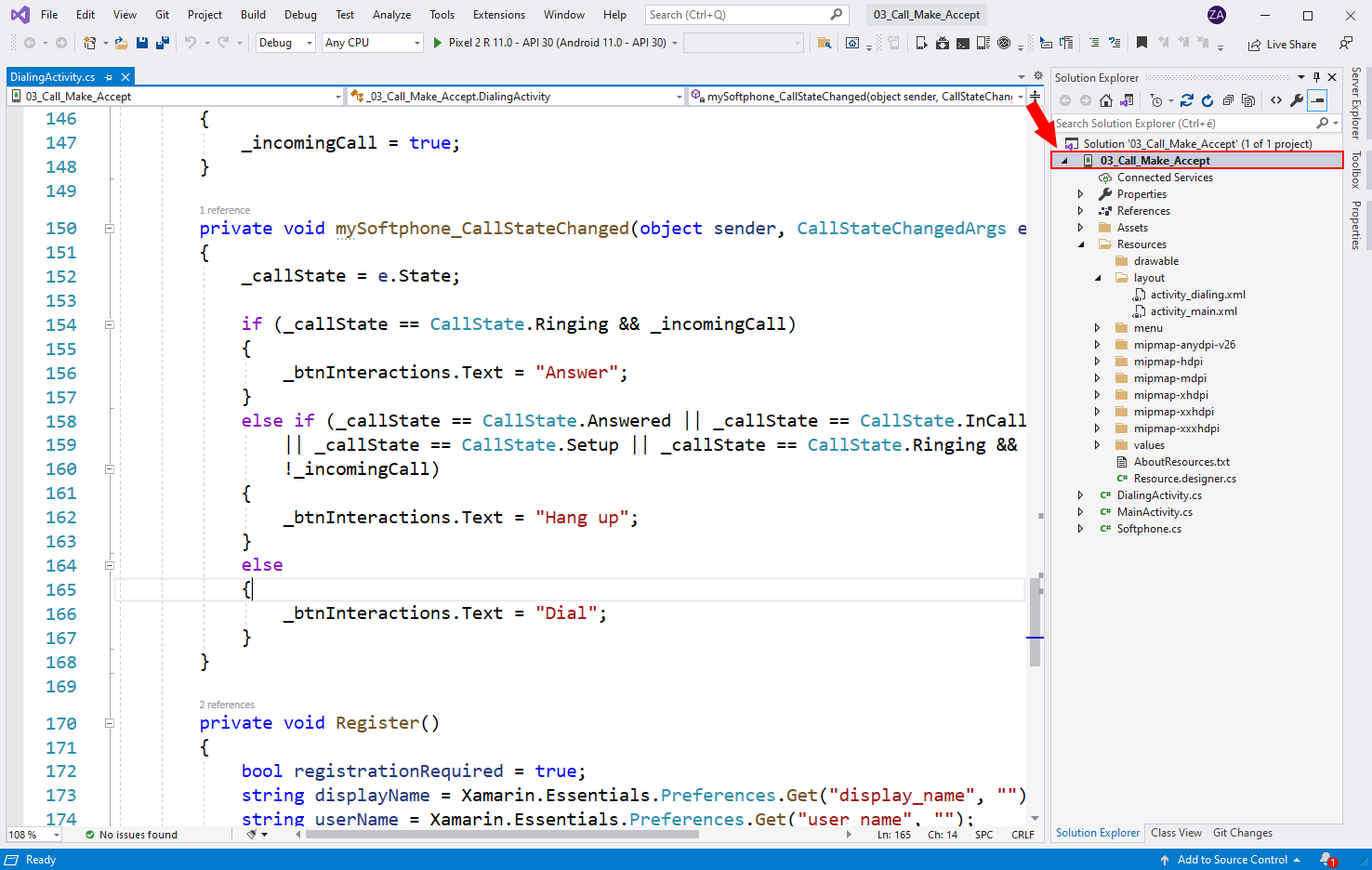
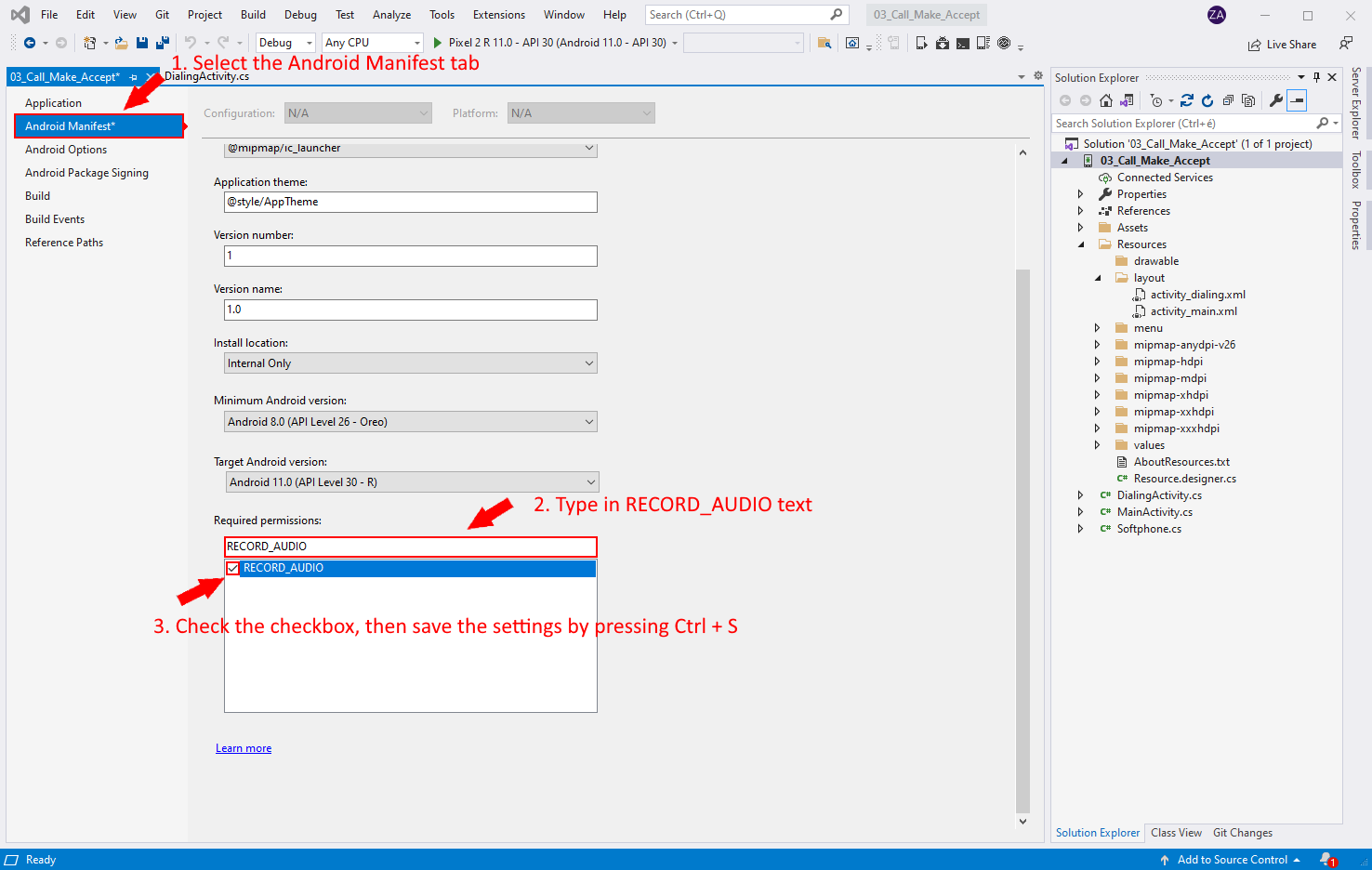
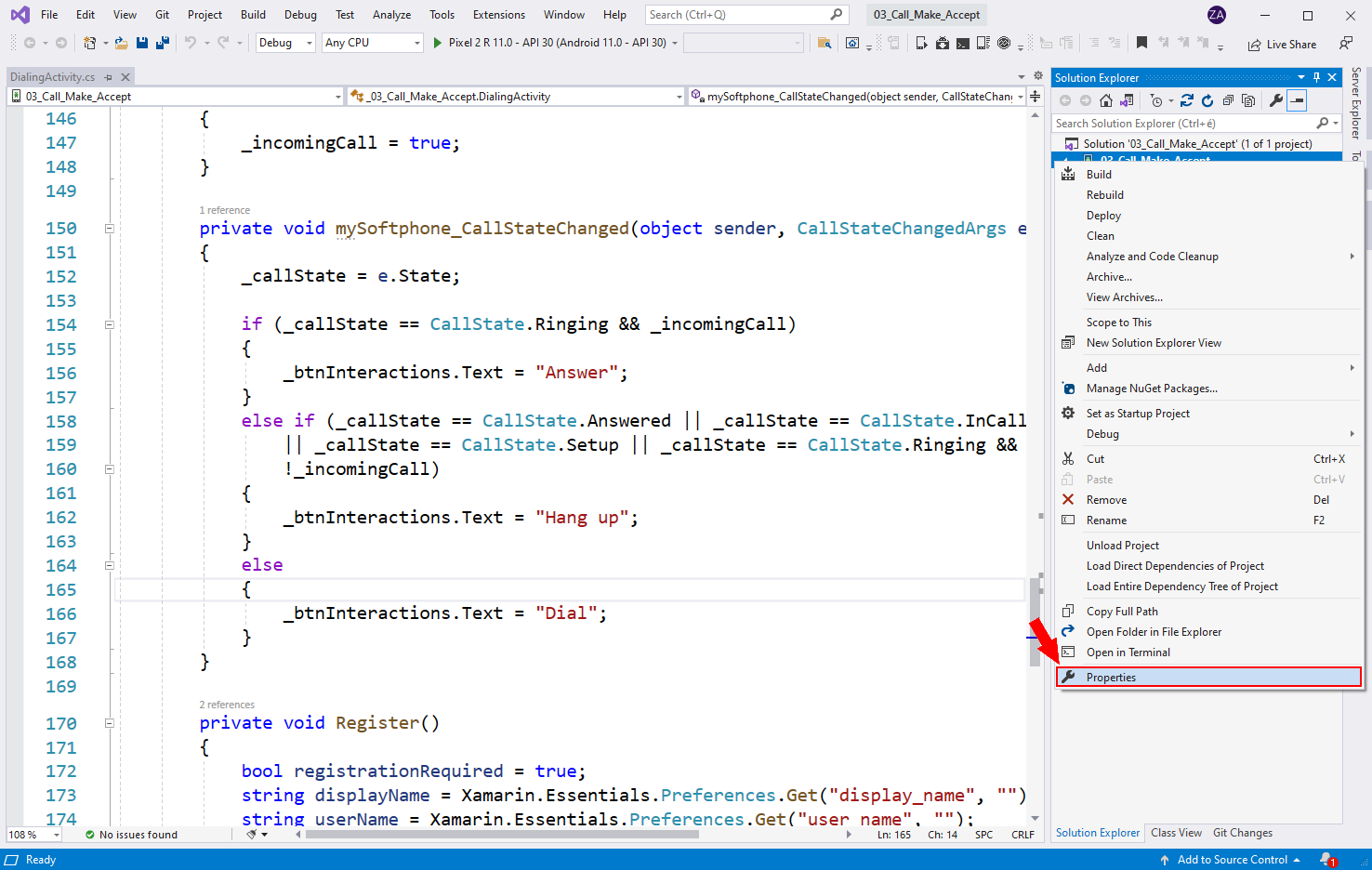
If you want to build a sopftphone application, you will need to ask for microphone permission for your application. In the following video I'll show you, how to allow the microphone in your Xamarin Android application.
Running the Softphone application
After the softphone is ready we can start debugging the application on an Android device with a version that's higher than Android 8.0. If we don't have an android device we can create an android emulator in the Visual Studio Community. In the following video you will also see, how to allow microphone for your application.