
OZEKI AI Gateway
Take control of your AI infrastructure by routing AI requests through a centeral AI gateway system. Ozeki AI Gateway is an on-premises software that allows you to control AI usage throughout your organization. With Ozeki AI gateway, you can create AI user accouts for humans, AI agents, or AI software and you can assign custom API keys to them. You can also log AI requests and keep token usage and costs in bay.
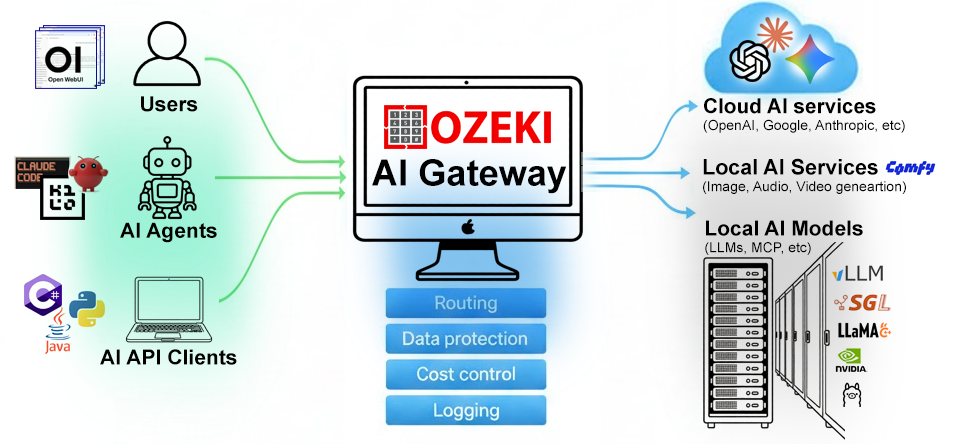
Install Ozeki AI Gateway on Ubuntu Linux:
sudo curl -fsSL https://repo.ozeki.hu/ozekiaigateway.gpg.key | sudo gpg --dearmor -o /etc/apt/trusted.gpg.d/ozekiaigateway.gpg
sudo echo "deb [arch=all] https://repo.ozeki.hu/ noble main" | sudo tee /etc/apt/sources.list.d/ozekiaigateway.list
sudo apt update
sudo apt install ozekiaigateway
After installation navigate to:
Browser: http://localhost/ozeki
Install Ozeki AI Gateway on Windows:
1. Download and Install WAMP Server
2. Download and Install Ozeki AI Gateway
3. Follow the installation instructions for Windows
4. Open browser and navigate to http://localhost/ozeki
System Requirements:
- Windows 10/11 or Windows Server 2019/2022
- .NET Framework 4.8 or higher
- 4GB RAM minimum (8GB recommended)
- 500MB free disk space
Install Ozeki AI Gateway on macOS:
# Using Homebrew
brew install ozekiaigateway

# Or download the DMG package from our website
# Then open the DMG and drag Ozeki AI Gateway to Applications

# After installation, open browser and navigate to:
http://localhost/ozeki
System Requirements:
- macOS 11 (Big Sur) or higher
- Apple Silicon (M1/M2/M3) or Intel processor
- 4GB RAM minimum (8GB recommended)
- 500MB free disk space