
How to ring a SIP/VoIP phone from Android
 |
Download: | SipInviteAndroid.zip |
This example demonstrates how to implement the sip invite method in c#. The INVITE SIP method indicates that a client is being invited to participate in a call session. To use this example, you need to have Ozeki Android VoIP SIP SDK installed, and a reference to ozeki.dll should be added to your visual studio project.
How does ringing an SIP/VoIP work
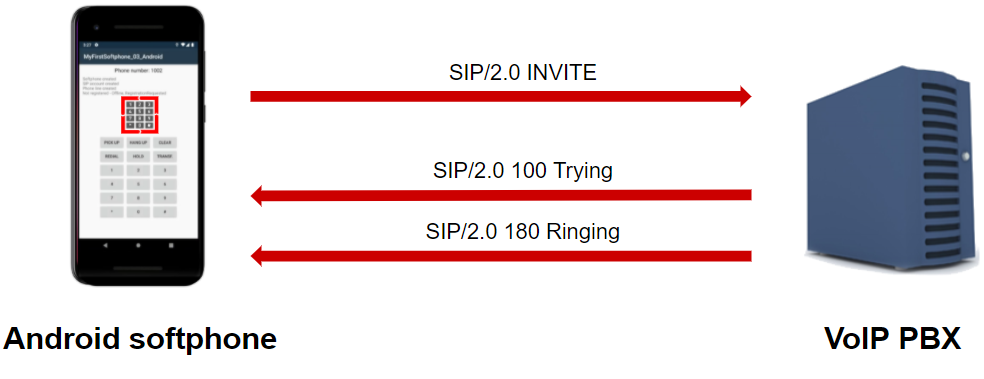
This SIP/VoIP phone system makes it possible to ring a VoIP phone from Android. The setup consists of an Android softphone and a VoIP PBX. The Android softphone will send an INVITE method. The VoIP PBX will send back a TRYING method which means that the INVITE method was accepted successfully. After those, the VoIP PBX will send a RINGING method which means that the VoIP PBX is being notified of the calling. After the PBX accepts it, the call will start.
How to ring a SIP/VoIP phone from Android (Video tutorial)
In this video, we are going to show you how to ring a SIP/VoIP phone from Android. This video will start with creating a new project and will end with the launched virtual phone. You will learn how to create a project to do the work and a virtual phone. The video is only 5:43 long but it contains all the necessary steps in a very detailed way. We tried our best to make following it as simple as possible. You will have no problem with following it.
What is a SIP INVITE method? When is it needed?
The INVITE is a SIP method that specifies the action that the requester (Calling Party) wants the server (Called Party) to take. The INVITE message contains a number of header fields. Header fields are named attributes that provide additional information about a message. The ones present in an INVITE include a unique identifier for the call, the destination address, Calling Party Address, information about supported codecs, and more information about the type of session that the requester wishes to establish with the server.
Sip invite is being explained by an example as well, as you can see on Figure 1; from Ozeki VoIP SIP SDK an INVITE request is being sent through a PBX, to a Softphone. A "101 Trying" message is being sent back, and if the request has reached the destination, a "180 Ringing" message is going to indicate that the softphone is ringing. When the session is being established, a "200 OK" message is being sent to the caller, which than sends back an "ACK" message to confirm it received the final response to the INVITE request.
How to implement SIP INVITE method using C#?
To perform the SIP INVITE task in C# using Ozeki VoIP SIP SDK, you need to implement the register process, than you need to use the IPhoneCall interface to create a call as an object, subscribe to its CallStateChanged and CallErrorOccured events to get notified about the call's state, and make the call by calling the object's Start() method (see sip invite example below).
Ring extension using SIP INVITE request in C#
using Android.App;
using Android.Content;
using Android.OS;
using Android.Runtime;
using Android.Views;
using Android.Widget;
using Ozeki.Media;
using Ozeki.VoIP;
using System;
using System.Collections.Generic;
using System.Linq;
using System.Text;
using System.Threading.Tasks;

namespace SipInviteAndroid
{
    partial class MainActivity
    {
        const string PHONE_NUMER = "100";
        const string SIP_REG_DOMAIN_HOST = "192.168.0.126";


        static ISoftPhone _softPhone;   // softphone object
        static IPhoneLine _phoneLine;   // phoneline object
        static IPhoneCall _call;

        private void CreateSoftphone()
        {
            // Create a softphone object with RTP port range 5000-10000
            _softPhone = SoftPhoneFactory.CreateSoftPhone(5000, 10000);

            // SIP account registration data, (supplied by your VoIP service provider)
            var registrationRequired = true;
            var userName = PHONE_NUMER;
            var displayName = PHONE_NUMER;
            var authenticationId = PHONE_NUMER;
            var registerPassword = PHONE_NUMER;
            var domainHost = SIP_REG_DOMAIN_HOST;
            var domainPort = 5060;

            var account = new SIPAccount(registrationRequired, displayName, userName, authenticationId, registerPassword, domainHost, domainPort);

            // Send SIP regitration request
            RegisterAccount(account);
        }

        private void RegisterAccount(SIPAccount account)
        {
            try
            {
                _phoneLine = _softPhone.CreatePhoneLine(account);
                _phoneLine.RegistrationStateChanged += line_RegStateChanged;
                _softPhone.RegisterPhoneLine(_phoneLine);
            }
            catch (Exception ex)
            {
                Log("Error during SIP registration: " + ex);
            }
        }

        private void line_RegStateChanged(object sender, RegistrationStateChangedArgs e)
        {
            if (e.State == RegState.NotRegistered || e.State == RegState.Error)

                Log("Registration failed!");

            if (e.State == RegState.RegistrationSucceeded)
            {
                Log("Registration succeeded - Online!");
                CreateCall();
            }
        }

        private void CreateCall()
        {
            var numberToDial = "200";
            _call = _softPhone.CreateCallObject(_phoneLine, numberToDial);
            _call.CallStateChanged += Call_CallStateChanged;
            _call.Start();
        }

        private void Call_CallStateChanged(object sender, CallStateChangedArgs e)
        {
            Log("Call state:" + e.State);
        }

    }
}
SIP INVITE PDU sent over the network
The SIP INVITE message is being sent when a party tries to call another. The PBX asks for authentication information. The softphone provides the authentication information, than the PBX indicates that it is trying to reach the called party. If the called party is being reached, it sends back the Ringing message.
You can see the PDUs responsible for these below:
Step 1: Invite request via the PBX (UDP message, Softphone -> Softphone)
INVITE sip:9999@192.168.115.149 SIP/2.0
Via: SIP/2.0/UDP 192.168.115.149:5920;branch=z9hG4bKf76d02e1-1bda-4435-a38d-
2577c0f1b73a;rport
To: <sip:9999@192.168.115.149>
From: "1001"<sip:1001@192.168.115.149>;tag=yudievxj
CSeq: 1 INVITE
Call-ID: bueqycetejwbeiqcunumrevusitxqmdfyxsyqljybyufynpyoe
Max-Forwards: 70
Contact: <sip:1001@192.168.115.149:5920>
User-Agent: Ozeki VoIP SIP SDK v10.1.8
Allow: INVITE, ACK, CANCEL, OPTIONS, BYE, SUBSCRIBE, NOTIFY, REFER, INFO, MESSAGE
Content-Type: application/sdp
Content-Length: 589

v=0
o=- 1158774478 1158774478 IN IP4 192.168.115.149
s=Ozeki VoIP SIP SDK v10.1.8
c=IN IP4 192.168.115.149
t=0 0
m=audio 6309 RTP/AVP 8 0 3 101 9 104 98
a=rtpmap:8 PCMA/8000
a=rtpmap:0 PCMU/8000
a=rtpmap:3 GSM/8000
a=rtpmap:101 telephone-event/8000
a=rtpmap:9 G722/8000
a=fmtp:9 bitrate=64000
a=rtpmap:104 G726-16/8000
a=rtpmap:98 iLBC/8000
a=fmtp:98 mode=20
a=sendrecv
m=video 6530 RTP/AVP 34 102 99
a=rtpmap:34 H263/90000
a=fmtp:34 QCIF=1;CIF=1
a=rtpmap:102 H263-1998/90000
a=fmtp:102 QCIF=1;CIF=1
a=rtpmap:99 H264/90000
a=fmtp:99 packetization-mode=1
a=sendrecv
Step 2: Reply from PBX that it is trying to reach the called party (UDP message, PBX -> softphone)
SIP/2.0 100 Trying
Via: SIP/2.0/UDP 192.168.115.149:5920;branch=z9hG4bKf76d02e1-1bda-4435-a38d-
2577c0f1b73a;rport=5920;
received=192.168.115.149
From: "1001"<sip:1001@192.168.115.149>;tag=yudievxj
Call-ID: bueqycetejwbeiqcunumrevusitxqmdfyxsyqljybyufynpyoe
CSeq: 1 INVITE
To: <sip:9999@192.168.115.149>
User-Agent: Ozeki Phone System XE v5.2.1
Content-Length: 0
Step 3: Reply from PBX with request for sip invite authentication (UDP message, PBX -> Softphone)
SIP/2.0 407 Proxy Authentication Required
Via: SIP/2.0/UDP 192.168.115.149:5920;branch=z9hG4bKf76d02e1-1bda-4435-a38d-
2577c0f1b73a;rport=5920;
received=192.168.115.149
From: "1001"<sip:1001@192.168.115.149>;tag=yudievxj
Call-ID: bueqycetejwbeiqcunumrevusitxqmdfyxsyqljybyufynpyoe
CSeq: 1 INVITE
To: <sip:9999@192.168.115.149>;tag=chdmsspj
User-Agent: Ozeki Phone System XE v5.2.1
Content-Length: 0
Proxy-Authenticate:Digest nonce="6652a236231c44029a9ae7bf793e15f9", realm="OzekiPBX",
algorithm=MD5
Step 4: Acknowledge of authentication (UDP message, Softphone -> PBX)
ACK sip:9999@192.168.115.149 SIP/2.0
Via: SIP/2.0/UDP 192.168.115.149:5920;branch=z9hG4bKf76d02e1-1bda-4435-a38d-
2577c0f1b73a;rport
Call-ID: bueqycetejwbeiqcunumrevusitxqmdfyxsyqljybyufynpyoe
From: "1001"<sip:1001@192.168.115.149>;tag=yudievxj
To: <sip:9999@192.168.115.149>;tag=chdmsspj
CSeq: 1 ACK
Max-Forwards: 70
Content-Length: 0
Step 5: Invite request with sip authentication information via PBX (UDP message, Softphone -> Softphone)
INVITE sip:9999@192.168.115.149 SIP/2.0
Via: SIP/2.0/UDP 192.168.115.149:5920;branch=z9hG4bK28ba5053-a4dd-4b85-87fd-
695292192185;rport
To: <sip:9999@192.168.115.149>
From: "1001"<sip:1001@192.168.115.149>;tag=yudievxj
CSeq: 2 INVITE
Call-ID: bueqycetejwbeiqcunumrevusitxqmdfyxsyqljybyufynpyoe
Max-Forwards: 70
Contact: <sip:1001@192.168.115.149:5920>
User-Agent: Ozeki VoIP SIP SDK v10.1.8
Allow: INVITE, ACK, CANCEL, OPTIONS, BYE, SUBSCRIBE, NOTIFY, REFER, INFO, MESSAGE
Content-Type: application/sdp
Proxy-Authorization:Digest username="1001",realm="OzekiPBX",
nonce="6652a236231c44029a9ae7bf793e15f9",
response="b63eb535d3c711dd77ea15d4f022bc07",uri="sip:9999@192.168.115.149",
algorithm=MD5
Content-Length: 589

v=0
o=- 1158774478 1158774478 IN IP4 192.168.115.149
s=Ozeki VoIP SIP SDK v10.1.8
c=IN IP4 192.168.115.149
t=0 0
m=audio 6309 RTP/AVP 8 0 3 101 9 104 98
a=rtpmap:8 PCMA/8000
a=rtpmap:0 PCMU/8000
a=rtpmap:3 GSM/8000
a=rtpmap:101 telephone-event/8000
a=rtpmap:9 G722/8000
a=fmtp:9 bitrate=64000
a=rtpmap:104 G726-16/8000
a=rtpmap:98 iLBC/8000
a=fmtp:98 mode=20
a=sendrecv
m=video 6530 RTP/AVP 34 102 99
a=rtpmap:34 H263/90000
a=fmtp:34 QCIF=1;CIF=1
a=rtpmap:102 H263-1998/90000
a=fmtp:102 QCIF=1;CIF=1
a=rtpmap:99 H264/90000
a=fmtp:99 packetization-mode=1
a=sendrecv
Step 6: Reply from PBX that it is trying to reach the called party (UDP message, PBX -> softphone)
SIP/2.0 100 Trying
Via: SIP/2.0/UDP 192.168.115.149:5920;branch=z9hG4bK28ba5053-a4dd-4b85-87fd-
695292192185;rport=5920;
received=192.168.115.149
From: "1001"<sip:1001@192.168.115.149>;tag=yudievxj
Call-ID: bueqycetejwbeiqcunumrevusitxqmdfyxsyqljybyufynpyoe
CSeq: 2 INVITE
To: <sip:9999@192.168.115.149>
User-Agent: Ozeki Phone System XE v5.2.1
Content-Length: 0
Step 7: Reply from the PBX about the called party is being in "Ringing" call sate (UDP message, PBX -> Softphone)
SIP/2.0 180 Ringing
Via: SIP/2.0/UDP 192.168.115.149:5920;branch=z9hG4bK28ba5053-a4dd-4b85-87fd-
695292192185;rport=5920;
received=192.168.115.149
From: "1001"<sip:1001@192.168.115.149>;tag=yudievxj
Call-ID: bueqycetejwbeiqcunumrevusitxqmdfyxsyqljybyufynpyoe
CSeq: 2 INVITE
To: <sip:9999@192.168.115.149>;tag=tguefhcq
User-Agent: Ozeki Phone System XE v5.2.1
Content-Length: 0
Contact: <sip:9999@192.168.115.149:5060>
Final thoughts
By reading this article, you have learned how to create an Android softphone that will ring a SIP/VoIP Phone. This will make communication in your organization much easier and more efficient because you can use it when you are making a phone call from your computer.
The information you have obtained is valuable, there are further useful documents in this guide, so keep on reading. Here, you can find more articles: Make a SIP VoIP call and Play mp3 into a call
Now your next thing to do is to download Ozeki SMS Gateway and configure this solution immediately! Everything is there to get it up and running in less than 10 minutes.